Capture One from a game controller
 The Capture One layout is built into InputConfig, free on the Mac App Store. You don't have to make an account, there are no subscriptions, and nothing is locked. Optimized for Apple silicon.
On a Mac: Capture One for Mac reads its rating, zoom and navigation keys from this layout. Turn on its auto-advance if you want each rating to move on.
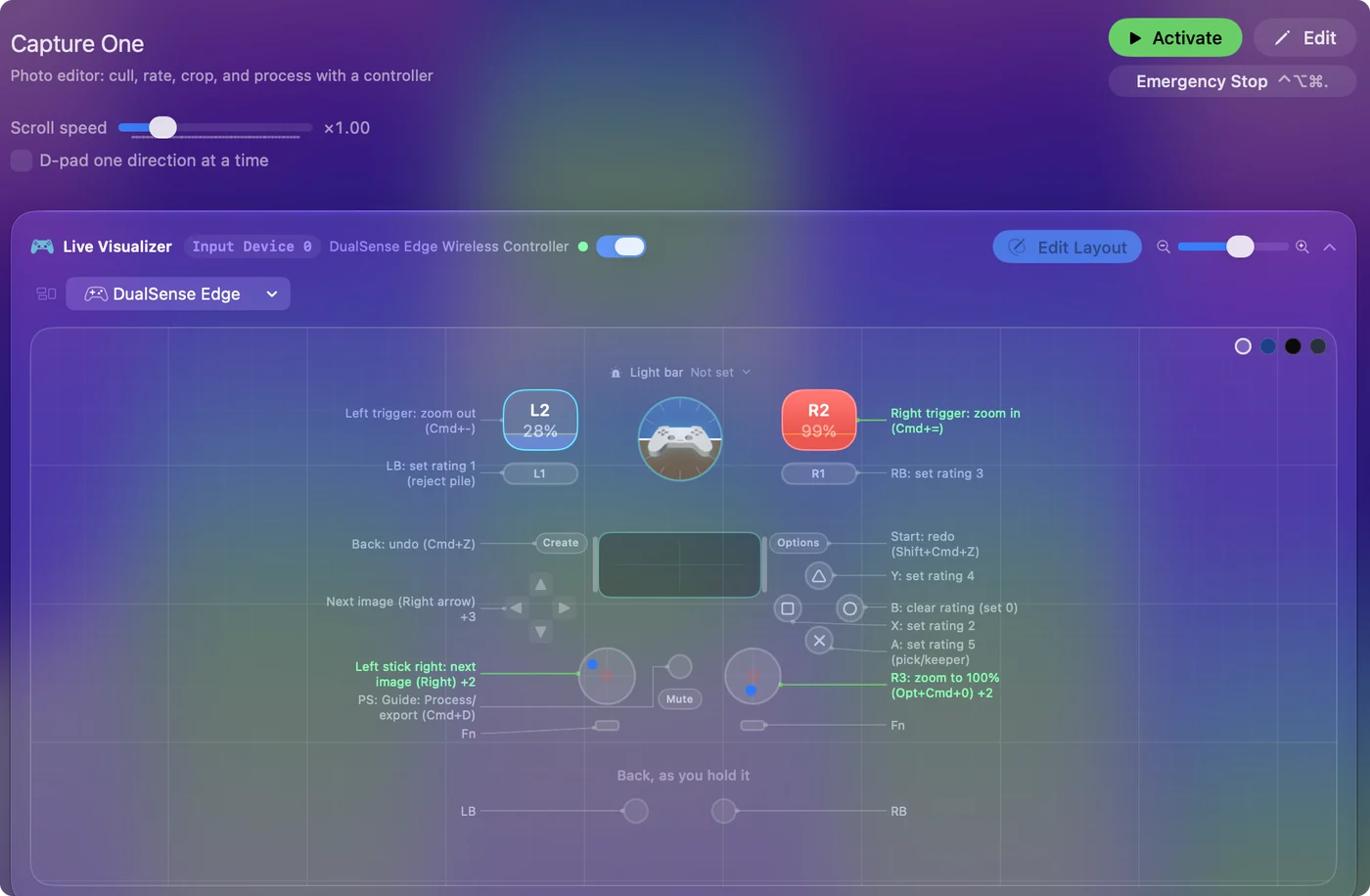
Yes, you can cull and rate in Capture One on a Mac from a game controller. It is a star keyboard under one thumb: the bottom button is five stars, the left bumper one, the right face button clears a rating, and the stick moves on. Zoom is on the triggers to check focus, and Process is on the Home button when the selects are done.
On this page: 7 sections
The layout, control by control
How the layout thinks
- Step images. Left stick left and right, and D-pad left and right.
- Rate. Five stars on the bottom face button, four on the top, two on the left, clear (0) on the right. One star on the left bumper, three on the right.
- Check focus. The triggers zoom in and out, the left stick click fits (Command 0), the right stick click goes to 100 percent (Option Command 0).
- Crop and rotate. D-pad up and down pick the Crop and Rotate tools.
- Undo, redo, process. Undo and redo on Share and Options, Process (Command D) on the Home button, and the right stick scrolls the browser.
Capture One reads its rating, zoom and navigation keys from this layout. Every rating is one press, and the stick moves on.
If the Home button does something else
The Home button is also where macOS can open Launchpad or Game Center for some controllers. Climb this ladder, smallest step first:
- Press it once with Capture One in front. If Process runs, nothing to fix.
- Check System Settings, Game Controllers. See what the Home button is set to for your controller.
- Move Process. Put Command D on a spare button instead.
Process is the one press you make at the end. If Home opens something else, move Process to another button.
Tune it for culling
- Auto-advance. Turn it on in Capture One and a rating moves to the next image by itself.
- Color tags. Put them behind a chord on the face buttons.
- Feel the one-star. Vibrate on the left bumper row, so a reject is felt.
- Coming from Lightroom. Lightroom uses flags and different keys. It has its own entry.
Auto-advance is what turns rating into a rhythm. With auto-advance on, each rating moves to the next image by itself.
Get it in two clicks
- Get InputConfig free on the Mac App Store, open it, and click Smart Preset Maker on the welcome screen.
- Search for Capture One and pick it. The layout is created as a preset in your sidebar, named and ready.
- Press Activate. Every row can be changed afterwards: the editor's Scan button rebinds any control the moment you touch it.
Every binding, as a table
| Controller | Sends | What it does |
|---|---|---|
| D-pad right | Right | Next image (Right arrow) |
| D-pad left | Left | Previous image (Left arrow) |
| Left stick right | Right | Left stick right: next image (Right) |
| Left stick left | Left | Left stick left: previous image (Left) |
| A / Cross | 5 | A: set rating 5 (pick/keeper) |
| X / Square | 2 | X: set rating 2 |
| Y / Triangle | 4 | Y: set rating 4 |
| B / Circle | 0 | B: clear rating (set 0) |
| LB / L1 | 1 | LB: set rating 1 (reject pile) |
| RB / R1 | 3 | RB: set rating 3 |
| D-pad up | C | Crop tool (C) |
| D-pad down | R | Rotate tool (R) |
| Right trigger | Command (Left), = | Right trigger: zoom in (Cmd+=) |
| Left trigger | Command (Left), - | Left trigger: zoom out (Cmd+-) |
| L3 (left stick click) | Command (Left), 0 | L3: zoom to fit (Cmd+0) |
| R3 (right stick click) | Alt / Option (Left), Command (Left), 0 | R3: zoom to 100% (Opt+Cmd+0) |
| Back / Share / Select | Command (Left), Z | Back: undo (Cmd+Z) |
| Start / Options | Shift (Left), Command (Left), Z | Start: redo (Shift+Cmd+Z) |
| Home / PS / Guide | Command (Left), D | Guide: Process/export (Cmd+D) |
| Right stick up | Scroll up | Right stick up: scroll browser up |
| Right stick down | Scroll down | Right stick down: scroll browser down |
Button names follow the Xbox / PlayStation pair shown in the editor, so A / Cross is the bottom face button on either pad. On a Switch Pro Controller the bottom button is labeled B; the mapping still fires on position.
Questions
Does it work in Lightroom?
Lightroom uses different keys. It has its own page.
Related
Completely free. You don't have to make an account, there are no subscriptions, and nothing is locked. Optimized for Apple silicon. Open source on GitHub.
Updated