Built-in presets
 InputConfig is completely free on the Mac App Store. You don't have to make an account, there are no subscriptions, and nothing is locked. Optimized for Apple silicon.
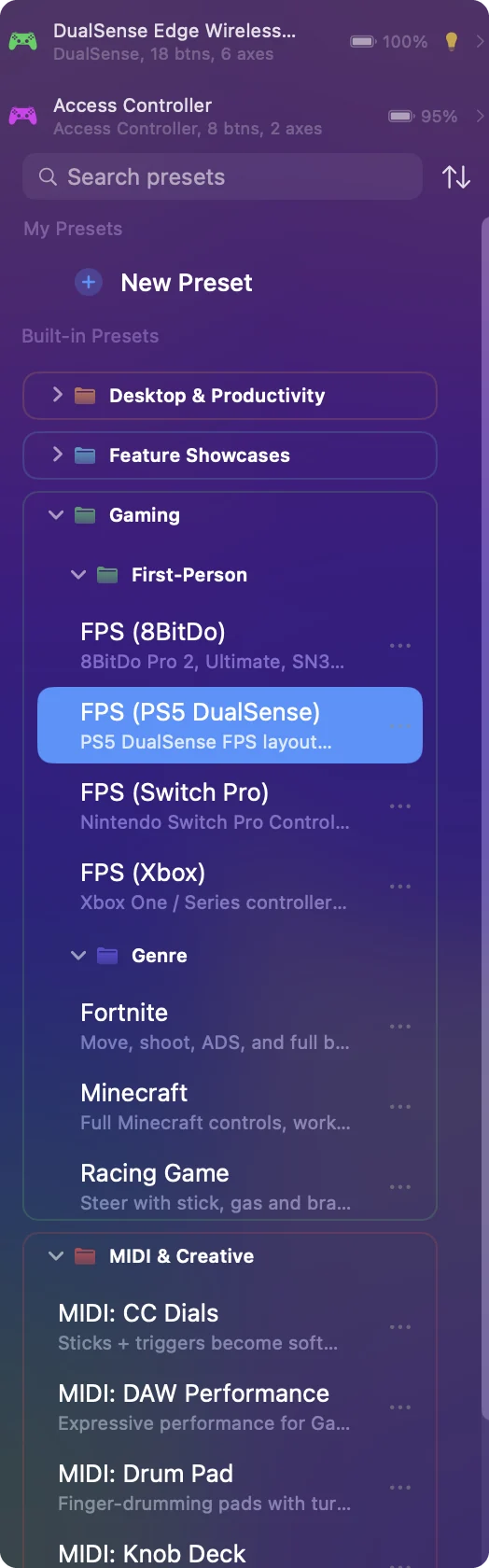
InputConfig ships with 46 built-in presets in folders, and every one is a working starting point to activate, edit or duplicate, with a note on every row. They sit under Built-in Presets in the sidebar. Each one also has its own page on this site with the full button map, in the preset library.
Desktop & Productivity
- Easy Browse and Easy Edit. Two calm everyday layouts: the whole Mac from a controller, and a controller in one hand with a mouse in the other.
- For the controller. Desktop Navigation, Web Browsing, Mouse + Scroll, Media Controller, Presentation Remote, Anki and Access Controller.
- For the Mac's own devices. Trackpad & Mouse (side buttons, middle click, force click), Modifier Holds (hold a modifier on its own) and Double Click Deck.
- Auto Clicker. Clicks for you, 5 to 20 times a second, on and off, while held, or a set number of times, from a controller, fn F6 and F7, or a mouse's side button.
Easy Browse is the gentlest place to start.
Gaming
- First-Person. One FPS preset per controller family so the button positions are native: FPS (PS5 DualSense), FPS (Xbox), FPS (Switch Pro) and FPS (8BitDo).
- Genre. Minecraft, Fortnite and Racing Game.
For any other game, the Smart Preset Maker builds a layout from more than 450 titles. Pick the FPS preset for your controller's family, not the game's.
MIDI & Creative
- MIDI out. MIDI: DAW Performance, MIDI: Drum Pad, MIDI: Transport Control and MIDI: CC Dials.
- MIDI in. MIDI: Knob Deck and MIDI: Media Deck.
The MIDI in presets are ready to re-scan onto your own keyboard or pad.
Feature Showcases
One per feature, so you can open it and see the settings: Variable Sensitivity, Deadzone Calibration, Haptic Feedback, Spoken Feedback, Macros & Turbo, Toggle Mode, Stacked Outputs, Hold & Double-Tap, Touchpad Mouse, Touchpad Zones, Cursor Regions, Stick Zones & Gestures, Gyro Aim, Motion Cursor, Steam Controller, Steam Controller (2026), Tap the Mac, One-Stick Driving, Keyboard & Mouse Input, and Shortcuts & Apps. Steam Controller (2026) is for Valve's 2026 controller, whose support is experimental, and Tap the Mac was tested on M4 MacBooks and did not work on an M1 Pro in our testing. Open a showcase to see exactly how a feature is set, then copy the rows you need.
Edit or copy one
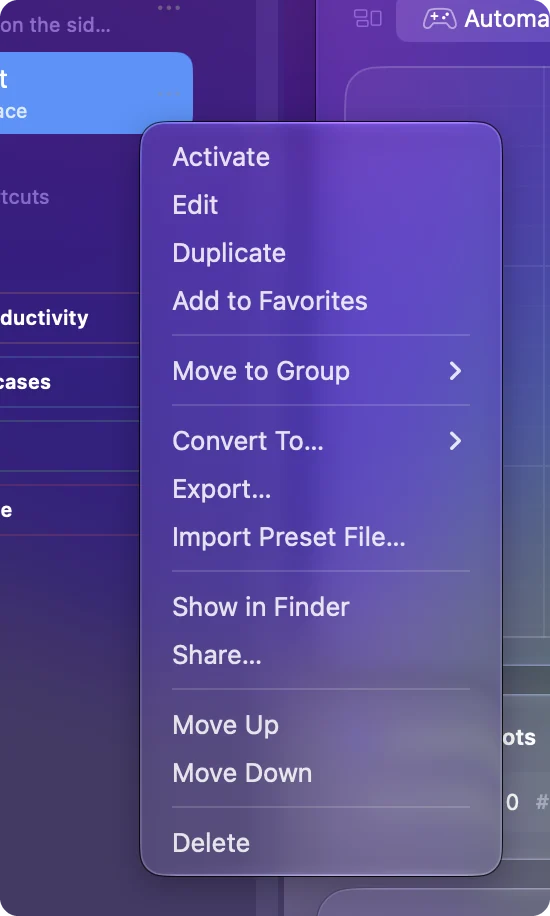
- Edit. They are ordinary presets in your data folder. Edit them, or Duplicate first to keep the original.
- Updates. An update leaves presets you changed alone, and new presets added in a release arrive alongside. A built-in preset you never changed can be updated to its new layout, and What's New lists these.
- Retired presets. A retired one moves to the Trash at the bottom of the sidebar, where you can put it back.
- Deleted by mistake. Restore Built-in Presets in Settings, Advanced, Data & storage puts it back, or download it again from its page on the site.
Duplicate before you edit, and the original stays as a reference.
Questions
Do the built-in presets come back after an update?
An update leaves presets you changed alone, and new presets added in a release arrive alongside. A built-in preset you never changed can be updated to its new layout (What's New lists these), and a retired one moves to the Trash at the bottom of the sidebar, where you can put it back.
Related
Completely free. You don't have to make an account, there are no subscriptions, and nothing is locked. Optimized for Apple silicon. Open source on GitHub.
Updated