Preview from a game controller
 The Preview layout is built into InputConfig, free on the Mac App Store. You don't have to make an account, there are no subscriptions, and nothing is locked. Optimized for Apple silicon.
On a Mac: Preview is built into macOS and takes its own shortcuts from this layout. Nothing to enable.
Yes, you can read PDFs in Preview from a game controller on a Mac. Next and previous page are on the two big buttons, the right stick scrolls pages taller than the screen, zoom is on the other two face buttons, and rotate is on the bumpers for the scans that came in sideways. Preview is the PDF reader most Mac users have and never think about, and from a controller it is a good one.
The layout, control by control
How the layout thinks
- Turn pages. Down Arrow on the bottom face button, Up Arrow on the right.
- Zoom. Zoom in and out (Command Plus and Command Minus) on the left and top face buttons.
- Rotate. Rotate Left (Command L) and Rotate Right (Command R) on the bumpers.
- Scroll and point. The right stick scrolls, the left stick is a pointer, the right trigger clicks, and Escape is on Options.
Preview is built in and takes its own shortcuts from this layout. The two big buttons are the page turners.
If a press scrolls instead of turning the page
In Single Page view the arrow keys step a whole page. In Continuous Scroll they move down the page a little.
- You: In Preview's View menu, choose Single Page.
- InputConfig: Keeps sending Down Arrow and Up Arrow from the two big buttons.
- Check: Press the bottom face button and the whole next page appears.
Continuous Scroll suits long documents with the right stick. Single Page suits reading like a book. Choose Single Page in the View menu and each press turns a whole page.
Tune it for reading
- Zoom to fit. Put Command 9 on the touchpad press. Actual Size is Command 0.
- Read it aloud. Select All, then Speak Selection, once Speak selection is on in System Settings, Accessibility, Spoken Content.
- Highlight. Control Command H on a stick click turns highlighting on. Then drag with the pointer and a held trigger.
- Sign and annotate. That is pointer work at small scale, so lower the Pointer speed slider on the preset's page.
- Sheet music. Preview makes a decent score reader. The page turner page shows how a piano pedal can turn the pages.
Most other PDF readers also step pages on the arrow keys, and the eBook Reader layout is the generic version. Single Page view and two buttons make Preview a book you hold from the sofa.
Get it in two clicks
- Get InputConfig free on the Mac App Store, open it, and click Smart Preset Maker on the welcome screen.
- Search for Preview and pick it. The layout is created as a preset in your sidebar, named and ready.
- Press Activate. Every row can be changed afterwards: the editor's Scan button rebinds any control the moment you touch it.
Every binding, as a table
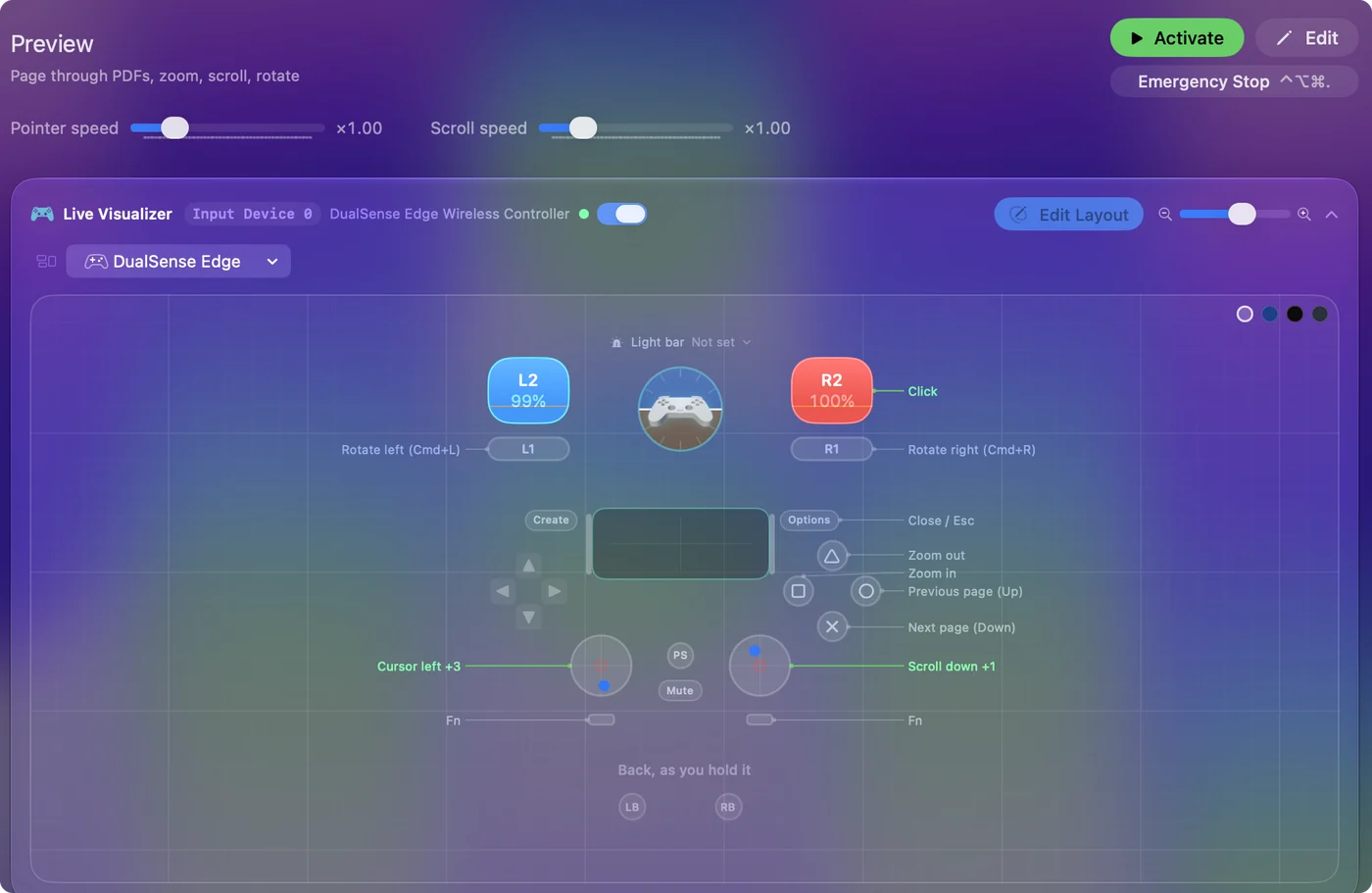
| Controller | Sends | What it does |
|---|---|---|
| Right stick down | Scroll down | Scroll down |
| Right stick up | Scroll up | Scroll up |
| Left stick left | Mouse motion left (speed 16) | Cursor left |
| Left stick right | Mouse motion right (speed 16) | Cursor right |
| Left stick up | Mouse motion up (speed 16) | Cursor up |
| Left stick down | Mouse motion down (speed 16) | Cursor down |
| Right trigger | Left click | Click |
| A / Cross | Down | Next page (Down) |
| B / Circle | Up | Previous page (Up) |
| X / Square | Command (Left), = | Zoom in |
| Y / Triangle | Command (Left), - | Zoom out |
| LB / L1 | Command (Left), L | Rotate left (Cmd+L) |
| RB / R1 | Command (Left), R | Rotate right (Cmd+R) |
| Start / Options | Escape | Close / Esc |
Button names follow the Xbox / PlayStation pair shown in the editor, so A / Cross is the bottom face button on either pad. On a Switch Pro Controller the bottom button is labeled B; the mapping still fires on position.
Questions
Does it work in other PDF readers?
Most step pages on the arrow keys too. The eBook Reader layout is the generic version.
Why does a press scroll a little instead of turning the page?
Preview is in Continuous Scroll view. Choose Single Page in the View menu and each press turns a whole page.
Related
Completely free. You don't have to make an account, there are no subscriptions, and nothing is locked. Optimized for Apple silicon. Open source on GitHub.
Updated