Questions
A sheet music page turner on a Mac
A Bluetooth page turner pedal usually works on a Mac with no app at all, because it pairs as a keyboard and sends the arrow keys. If you would rather use what you already own, a spare pedal on your digital piano or a game controller button can turn pages too.
Those two use InputConfig, a free Mac app I make, which turns the pedal or the button into a page turn in any reader.
On this page: 7 sections
Steps
- Find the key your score reader turns pages on, such as Right Arrow or Page Down.
- Pair a Bluetooth page turner, or connect your digital piano over USB.
- In InputConfig, add a row, press Scan and press the pedal or button.
- Set the output to the page turn key, and add a hold action for the previous page.
Try a Bluetooth page turner first
- You: Pair the pedal in System Settings, Bluetooth, open your score, and press.
- macOS: Treats most page turner pedals as a keyboard sending Right Arrow and Left Arrow, or Page Down and Page Up.
- Check: If the reader turns, you are done.
If it does not, the pedal is sending a key the reader ignores. Many pedals switch modes with a button combination in their manual, and one of those modes usually sends the arrows.
- Preview. Turns PDF pages on the arrow keys and Page Down.
- Score readers. forScore, which also runs on the Mac, supports page turner pedals; check your reader's help for the keys it turns on.
Whichever you use, the job is the same: find the key your reader turns on, then make your pedal or button send that key.
 InputConfig is free on the Mac App Store. macOS 14 or later, no account, no tracking, open source.
Use a pedal on your digital piano
Most digital pianos send their pedals over USB MIDI along with the notes. The sustain pedal is MIDI CC 64 and the soft pedal is CC 67. InputConfig reads them as switches, so a pedal press can send Right Arrow.
Step 1: Find the pedal's number
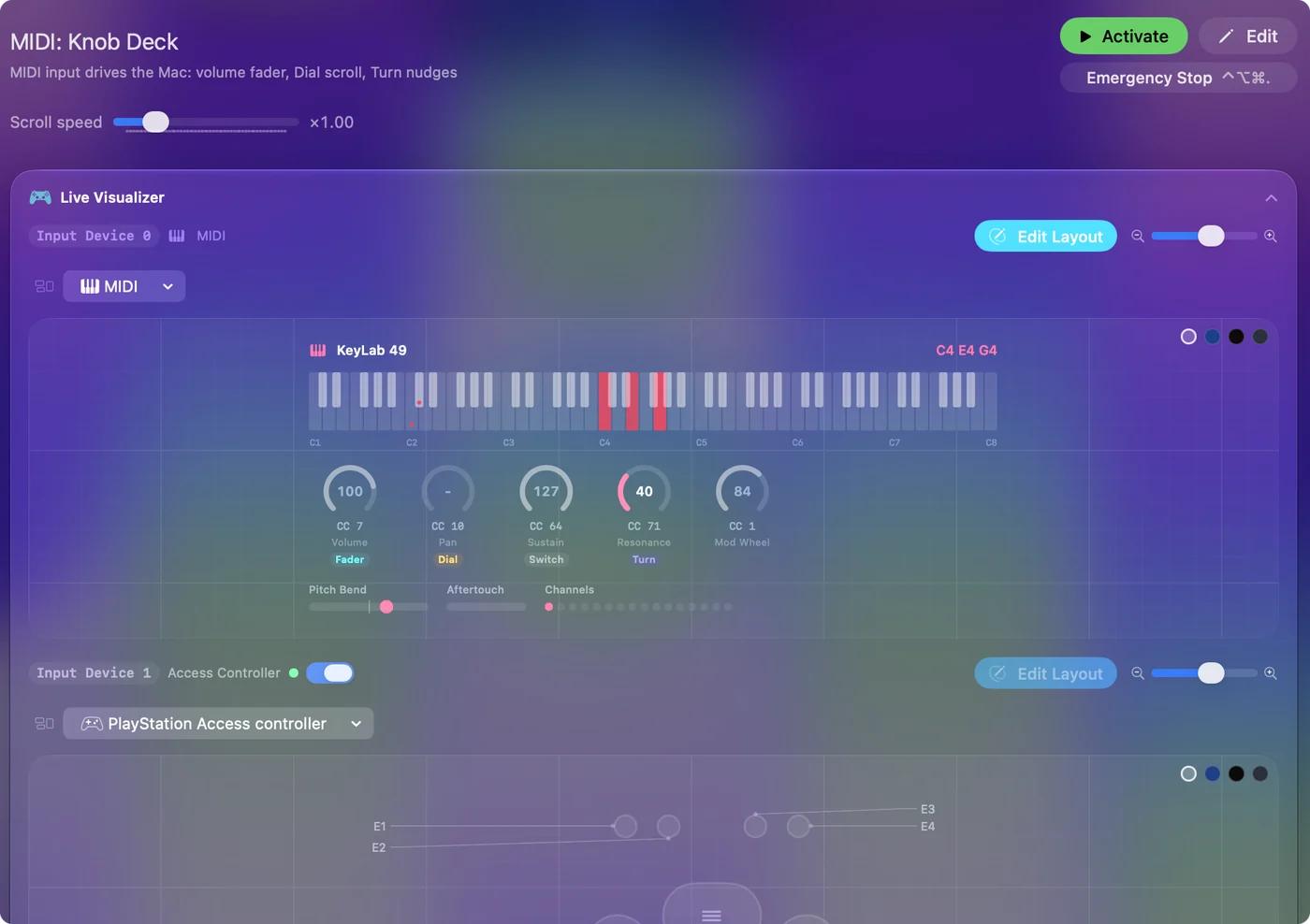
- You: Connect the piano to the Mac with its USB cable, open the Live Visualizer's MIDI view and press the pedal you want to use.
- InputConfig: Shows the pedal's CC number. No driver is needed for a class-compliant piano.
- Check: The number appears in the event log.
Step 2: Make it turn pages
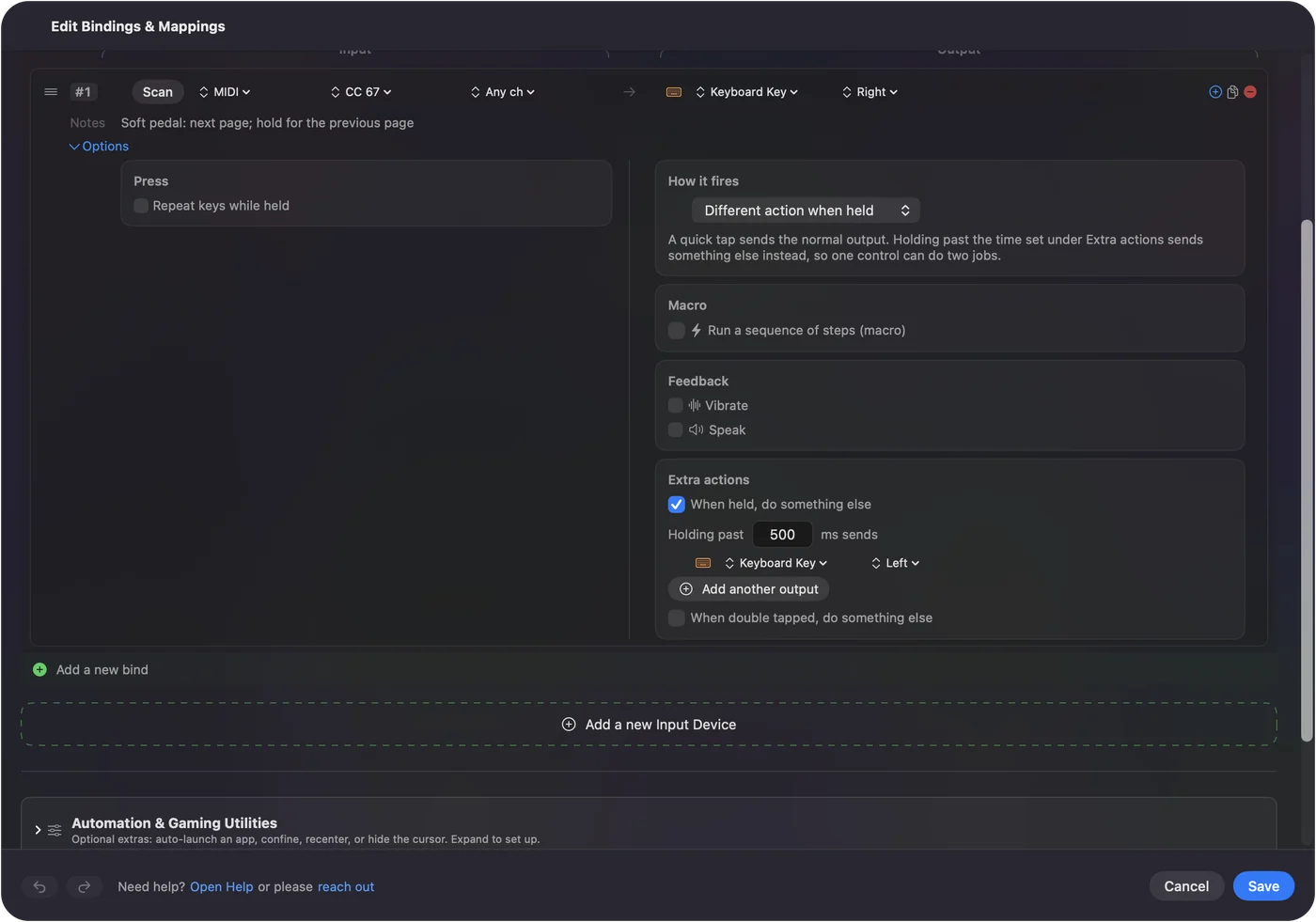
- You: In a preset, add a row, press Scan, press the pedal, and set the output to Right Arrow or Page Down. For going back, open the row's Options and add a hold action of Left Arrow.
- InputConfig: Sends the next page on a tap and the previous page on a hold.
- Check: Tap the pedal for the next page, hold it for the previous one.
One caution: the piano's own sound still follows the pedal. The soft pedal softens the note under your foot for the moment it is down, and the sustain pedal sustains, and a music app that listens to the piano also hears the pedal. Pick the pedal you need least in the piece, or use a separate MIDI foot switch.
Or put a game controller on the stand
A controller on the music stand, or a single Joy-Con, turns pages with whatever finger is free at the end of a line. Bind Right Arrow and Left Arrow to two buttons, or to the D-pad.
- A switch instead. For a player who cannot reach a pedal, a switch on an Xbox Adaptive Controller or a PlayStation Access controller does the same job; the adaptive controllers guide covers those.
- Only in the reader. Give the preset an auto-switch entry for your score reader under Activate when these apps are in front, and the pedal turns pages only while the reader is in front.
A single Joy-Con on the stand is the smallest page turner you may already own.
If the page does not turn
Climb this ladder, smallest step first:
- Bring the reader to the front. A key goes to the app in front.
- Check the key. Try Right Arrow and Page Down by hand on the keyboard; send whichever your reader turns on.
- Check the pedal arrives. If nothing shows in the MIDI view, the piano is not sending its pedals over USB.
If the keyboard key turns the page, the pedal can too.
The short version
- Simplest. A Bluetooth page turner pedal, no app needed.
- Already own a digital piano. A spare pedal over USB MIDI, tap for next, hold for previous.
- Already own a controller. Two buttons, or a single Joy-Con on the stand.
Find the key your reader turns on; everything else is making something press it.
Questions
Does a Bluetooth page turner pedal work on a Mac?
Usually, yes. It pairs as a keyboard and sends arrow keys or Page Up and Page Down, which most readers and Preview turn pages on.
Can I use my digital piano's pedal to turn pages?
Yes, if the piano sends its pedals over USB MIDI, which most do. Map the soft or sostenuto pedal to Right Arrow with InputConfig.
Will the pedal still change the piano's sound?
Yes. The piano reacts to its own pedal, so pick the one you use least in the piece, or add a separate MIDI foot switch.
Can one pedal turn forward and back?
Yes: a tap for the next page and a hold for the previous one, set as a hold action in the row's options.
Related
Free. macOS 14 or later. No account, nothing leaves your Mac. Open source on GitHub.