Microsoft PowerPoint from a game controller
 The Microsoft PowerPoint layout is built into InputConfig, free on the Mac App Store. You don't have to make an account, there are no subscriptions, and nothing is locked. Optimized for Apple silicon.
On a Mac: PowerPoint for Mac advances on the arrow keys and ends a show on Escape, which is what this layout sends. Nothing to enable in PowerPoint.
Yes, a PS5, Xbox or Switch controller makes a good PowerPoint remote on a Mac. This layout puts next and back on every side of the pad, Escape on a face button to end the show, and a pointer on the left stick, which a clicker does not have. A clicker is always in the other bag. A controller is probably already in a drawer.
On this page: 8 sections
The layout, control by control
How the layout thinks
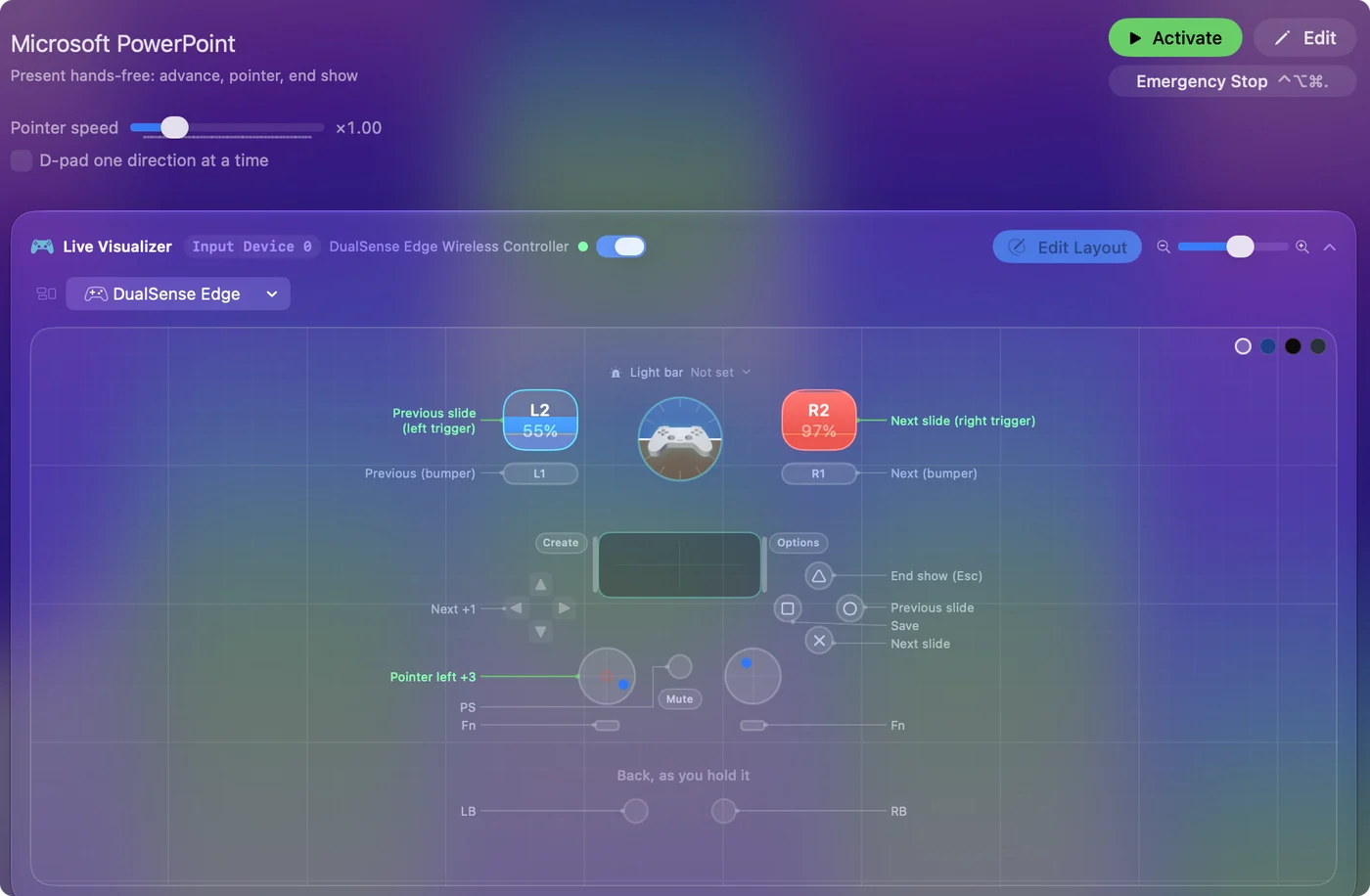
Next and back are on every side of the pad, so it works however you hold it: one-handed, upside down, behind your back.
- Next slide. The right trigger, the right bumper, the bottom face button and D-pad right.
- Previous slide. The left trigger, the left bumper, the right face button and D-pad left.
- End and save. The top face button is Escape to end the show, and the left one saves.
- Point at the slide. The left stick moves the pointer at a slower speed than the desktop layouts, so a nervous thumb does not send it across the screen.
That is not indecision. Every side of the pad has a next and a back, so you never have to look down.
Start the show from the pad
Most guides and many clickers start a slideshow with F5, which is the Windows key. Microsoft's list for PowerPoint on a Mac is:
- Command Shift Return. Start from the first slide.
- Command Return. Start from the current slide.
- Option Return. Start in Presenter View.
- B or period, W or comma. A black screen, a white screen.
- A number, then Return. Go to that slide.
- Command L. The laser pointer.
- Escape. End the show.
Put Command Shift Return on the Options button and the controller starts the show too. Black screen fits on the touchpad press, and a macro row of 1, 2, Return on a stick click jumps to slide 12, or whichever slide you always get asked about. On a Mac the show starts on Command Shift Return, not F5.
Tune it for presenting
- A pulse on every advance. In the next-slide rows' Options, under Feedback, turn on Vibrate at a low strength. You feel the slide move without looking at the screen. A DualSense, a DualShock 4 and an Xbox controller all rumble on a Mac. 8BitDo pads do not.
- Only while presenting. List PowerPoint under Activate when these apps are in front and turn on automatic switching in Settings, Advanced, so the buttons do nothing in other apps.
- Keynote as well. The Keynote layout uses the same keys if you present from both apps.
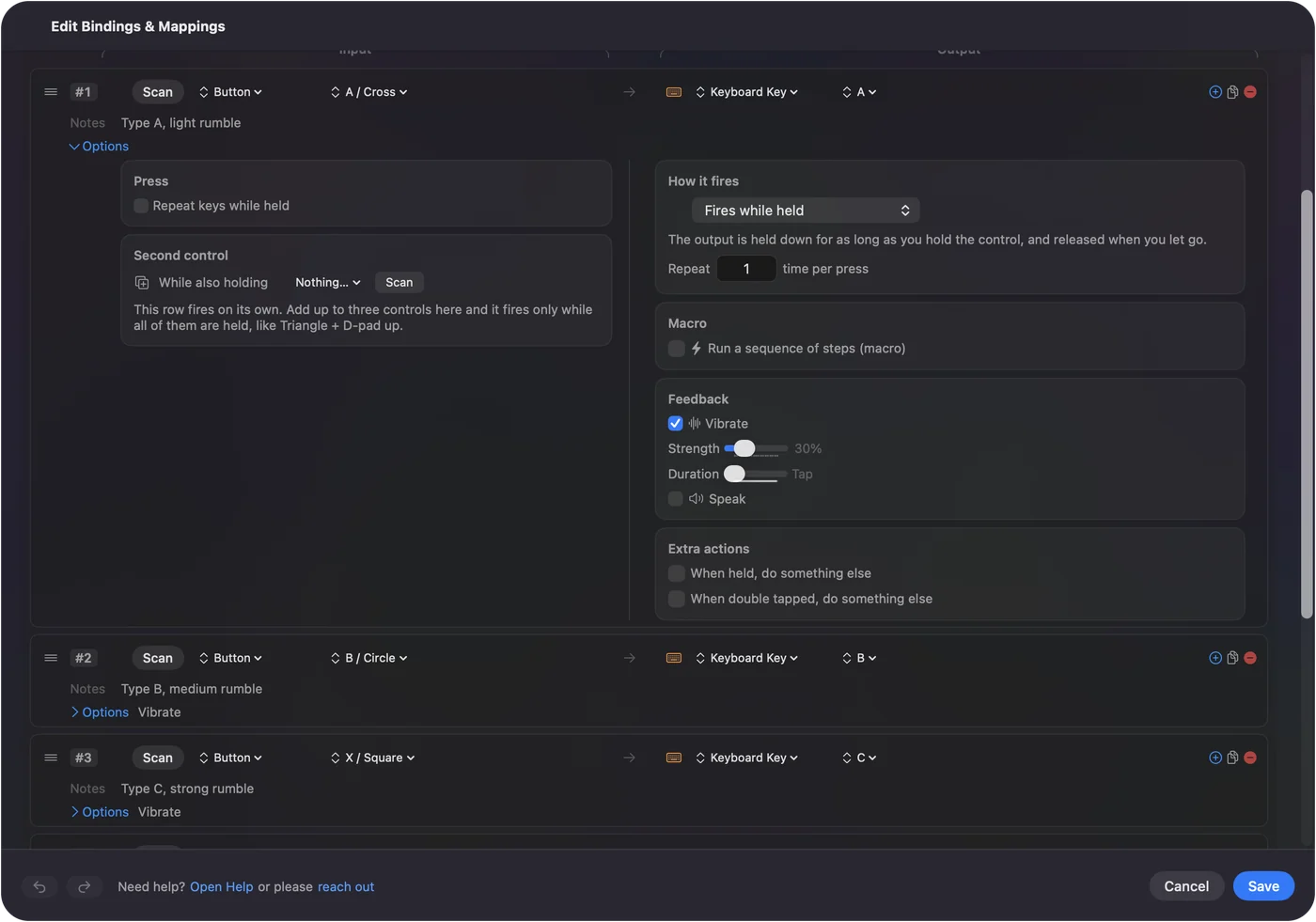
Set the pulse once and leave it. A pulse you can feel is what a remote should do and a clicker cannot.
The short version
- Pair the controller over Bluetooth. A DualSense or Xbox pad reaches about as far as most clickers in a normal room.
- Add the start key. Put Command Shift Return on Options.
- Turn on the pulse. Turn on Vibrate on the next-slide rows.
Run through the deck once with the controller before the real talk. Any button you grab moves the show, and the stick points at what you are talking about.
Get it in two clicks
- Get InputConfig free on the Mac App Store, open it, and click Smart Preset Maker on the welcome screen.
- Search for Microsoft PowerPoint and pick it. The layout is created as a preset in your sidebar, named and ready.
- Press Activate. Every row can be changed afterwards: the editor's Scan button rebinds any control the moment you touch it.
Every binding, as a table
| Controller | Sends | What it does |
|---|---|---|
| Right trigger | Right | Next slide (right trigger) |
| Left trigger | Left | Previous slide (left trigger) |
| A / Cross | Right | Next slide |
| B / Circle | Left | Previous slide |
| RB / R1 | Right | Next (bumper) |
| LB / L1 | Left | Previous (bumper) |
| D-pad right | Right | Next |
| D-pad left | Left | Previous |
| Y / Triangle | Escape | End show (Esc) |
| X / Square | Command (Left), S | Save |
| Left stick left | Mouse motion left (speed 14) | Pointer left |
| Left stick right | Mouse motion right (speed 14) | Pointer right |
| Left stick up | Mouse motion up (speed 14) | Pointer up |
| Left stick down | Mouse motion down (speed 14) | Pointer down |
Button names follow the Xbox / PlayStation pair shown in the editor, so A / Cross is the bottom face button on either pad. On a Switch Pro Controller the bottom button is labeled B; the mapping still fires on position.
Questions
Does it work over Bluetooth from across the room?
Yes. A DualSense or Xbox controller pairs with the Mac over Bluetooth and reaches about as far as most clickers in a normal room.
Will pressing a button do something in another app?
Only if that app is in front. List PowerPoint under Activate when these apps are in front and turn on automatic switching in Settings, Advanced, and the layout is only on while PowerPoint is.
Why does my clicker's start button do nothing in PowerPoint for Mac?
It probably sends F5, the Windows start key. Map a controller button to Command Shift Return instead, or see the presentation clicker page for clicker fixes.
Related
Completely free. You don't have to make an account, there are no subscriptions, and nothing is locked. Optimized for Apple silicon. Open source on GitHub.
Updated