Keynote from a game controller
 The Keynote layout is built into InputConfig, free on the Mac App Store. You don't have to make an account, there are no subscriptions, and nothing is locked. Optimized for Apple silicon.
On a Mac: Keynote advances on the arrow keys and plays on Option Command P, which is what this layout sends. Nothing to enable in Keynote.
Yes, a game controller works as a Keynote clicker on a Mac, and it can start the slideshow too, so you can begin from the back of the room. Next is under every finger, previous under the others, and the left stick moves a pointer for pointing at the screen. Keynote advances on the arrow keys and plays on Option Command P, which is what this layout sends.
The layout, control by control
How the layout thinks
- Next slide. The right trigger, the right bumper, the bottom face button and D-pad right.
- Previous slide. The left trigger, the left bumper, the right face button and D-pad left.
- Start and end. Play the slideshow (Option Command P) on the left face button, and Escape ends it from the top.
- Point. The left stick moves the pointer at a slower speed than the desktop layouts, so it stays where you aim it.
It works however you are holding the pad. Every side of the pad has a next and a back.
Keynote's presenting keys
From Apple's Keynote shortcut list. The layout covers the first four. Put the rest on spare buttons.
| Key | What it does while presenting | In this layout |
|---|---|---|
| Option Command P | Play the slideshow | Left face button |
| Right Arrow | Next slide or build | Right trigger, right bumper, bottom face button, D-pad right |
| Left Arrow | Previous slide | The opposites |
| Escape | End the show | Top face button |
| C | Show or hide the pointer | Add it to a stick click |
| B / W | Pause on a black or white screen | Add it to a spare button |
| S | Show the slide number | Optional |
| X | Swap the presenter and audience displays | Optional |
A slide number followed by Return jumps to that slide, and a macro row does it in one press. Put C on a stick click, or the pointer you steer stays hidden.
Tune it for presenting
- A pulse on every advance. Vibrate at a low strength on the next-slide rows, set under Feedback in each row's Options, tells your hand the slide moved without looking at the screen.
- Switch on by itself. If the remote sits in a pocket between talks, list Keynote under Activate when these apps are in front and turn on automatic switching in Settings, Advanced.
- PowerPoint as well. The PowerPoint layout uses the same next and back keys.
If you have an iPhone, Keynote Remote is built into Keynote on iPhone and is the first thing to try. A controller is for real buttons, a pointer on a stick, and a remote that does not also ring.
Get it in two clicks
- Get InputConfig free on the Mac App Store, open it, and click Smart Preset Maker on the welcome screen.
- Search for Keynote and pick it. The layout is created as a preset in your sidebar, named and ready.
- Press Activate. Every row can be changed afterwards: the editor's Scan button rebinds any control the moment you touch it.
Every binding, as a table
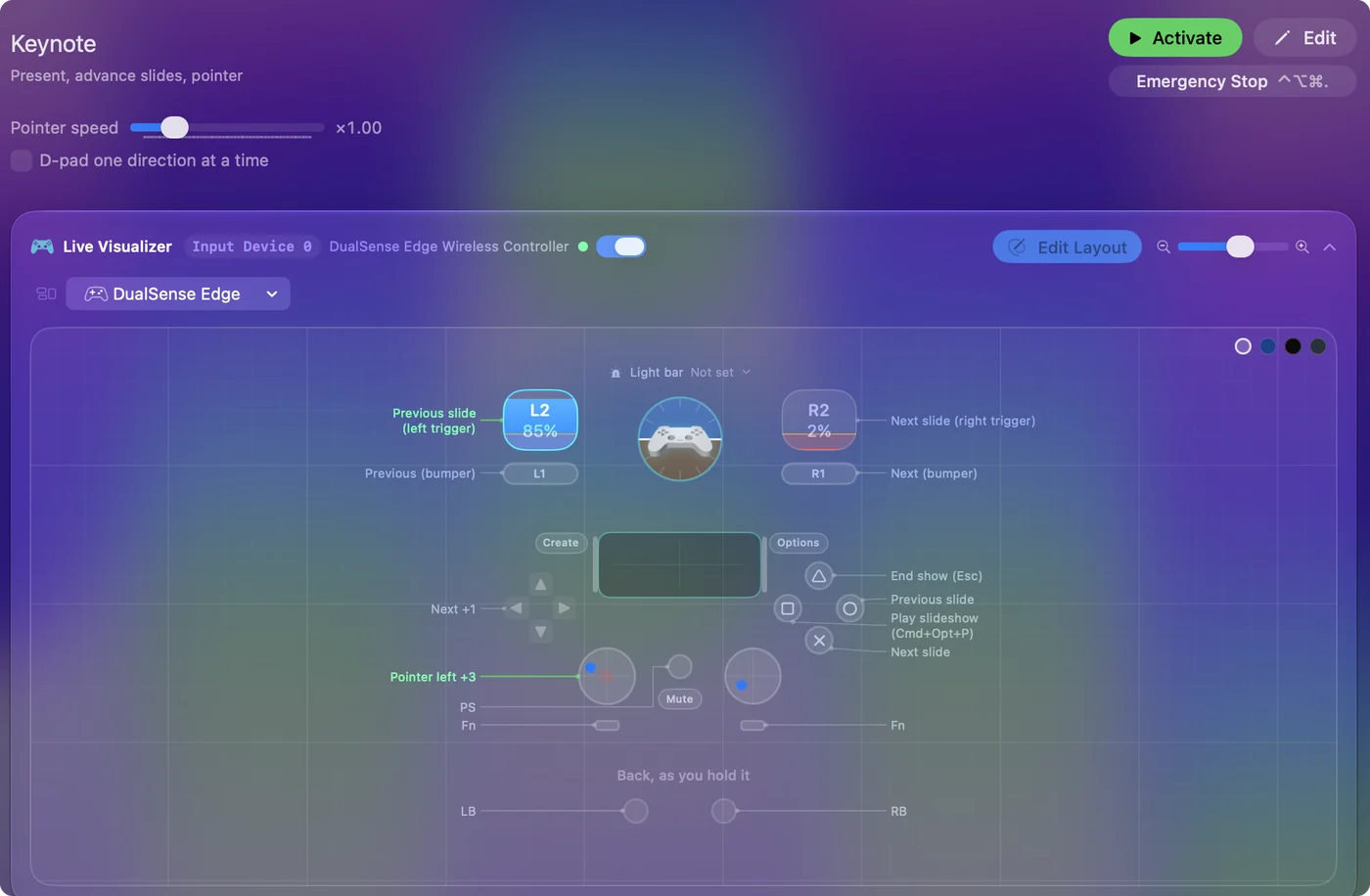
| Controller | Sends | What it does |
|---|---|---|
| Right trigger | Right | Next slide (right trigger) |
| Left trigger | Left | Previous slide (left trigger) |
| A / Cross | Right | Next slide |
| B / Circle | Left | Previous slide |
| RB / R1 | Right | Next (bumper) |
| LB / L1 | Left | Previous (bumper) |
| D-pad right | Right | Next |
| D-pad left | Left | Previous |
| Y / Triangle | Escape | End show (Esc) |
| X / Square | Command (Left), Alt / Option (Left), P | Play slideshow (Cmd+Opt+P) |
| Left stick left | Mouse motion left (speed 14) | Pointer left |
| Left stick right | Mouse motion right (speed 14) | Pointer right |
| Left stick up | Mouse motion up (speed 14) | Pointer up |
| Left stick down | Mouse motion down (speed 14) | Pointer down |
Button names follow the Xbox / PlayStation pair shown in the editor, so A / Cross is the bottom face button on either pad. On a Switch Pro Controller the bottom button is labeled B; the mapping still fires on position.
Questions
Does it work from across the room?
Over Bluetooth, yes, about as far as most clickers in an ordinary room.
Can I use my iPhone as a Keynote remote instead?
Yes, and if you have one it is the first thing to try: Keynote on iPhone has Keynote Remote built in. A controller is for when you want real buttons, a pointer on a stick, or a remote that does not also ring.
How do I show a pointer in a Keynote slideshow?
Press C during the show to show or hide the pointer. In this layout the left stick moves it, so bind C to a stick click.
Related
Completely free. You don't have to make an account, there are no subscriptions, and nothing is locked. Optimized for Apple silicon. Open source on GitHub.
Updated