Kindle from a game controller
 The Kindle layout is built into InputConfig, free on the Mac App Store. You don't have to make an account, there are no subscriptions, and nothing is locked. Optimized for Apple silicon.
On a Mac: The Kindle app reads keys from this layout while it is in front. A few rows carry Windows-style keys. The app's menus show the Mac ones.
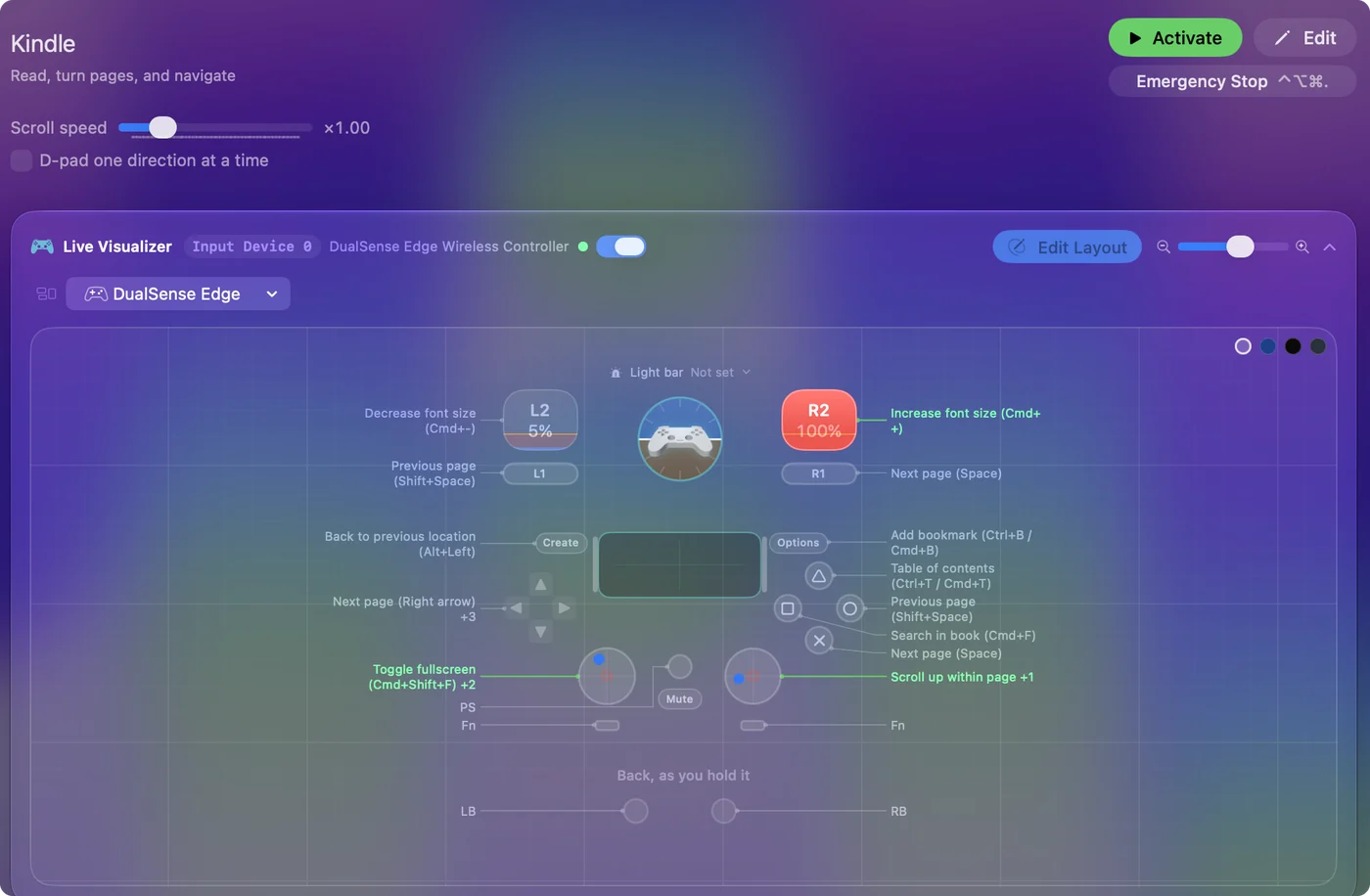
Yes, you can read Kindle books on a Mac with a game controller, and next page sits under every thumb, because whichever thumb is closer is the right one. Contents and search have face buttons, and the triggers change the font size. Two rows carry keys that may not match the Mac app, and this page says which.
The layout, control by control
How the layout thinks
- Turn pages. Next page (Space) on the bottom face button and the right bumper, Right Arrow on D-pad right and the left stick. Previous page (Shift Space) on the right face button and the left bumper, Left Arrow on D-pad left and the stick.
- Find your place. Table of contents (Command T) on the top face button, search (Command F) on the left, a bookmark (Command B) on Start.
- Read comfortably. The triggers change the font size, the right stick scrolls within a page, and D-pad up and down scroll a line.
Check the back and full screen rows
- You: Open the Kindle app's View and Go menus and read the keys for going back to your last location and for full screen.
- InputConfig: Sends Option Left Arrow on Back, Share or View and Command Shift F on the left stick click until you change them.
- Check: Press each one in a book. If nothing happens, set the row to the key from the menu.
The page turns work from the first press, so read now and fix these two later.
Tune it for long reads
- Feel the page turn. Tick Vibrate under Feedback in the next page rows' Options, at a low strength.
- One button only. For a switch user, next page is enough. The single switch guide covers it.
- Read aloud. Use Speak Selection after selecting a passage.
For a book, a controller is the most relaxed input there is.
Get it in two clicks
- Get InputConfig free on the Mac App Store, open it, and click Smart Preset Maker on the welcome screen.
- Search for Kindle and pick it. The layout is created as a preset in your sidebar, named and ready.
- Press Activate. Every row can be changed afterwards: the editor's Scan button rebinds any control the moment you touch it.
Every binding, as a table
| Controller | Sends | What it does |
|---|---|---|
| A / Cross | Space | Next page (Space) |
| B / Circle | Shift (Left), Space | Previous page (Shift+Space) |
| RB / R1 | Space | Next page (Space) |
| LB / L1 | Shift (Left), Space | Previous page (Shift+Space) |
| Y / Triangle | Command (Left), T | Table of contents (Ctrl+T / Cmd+T) |
| X / Square | Command (Left), F | Search in book (Cmd+F) |
| Start / Options | Command (Left), B | Add bookmark (Ctrl+B / Cmd+B) |
| Back / Share / Select | Alt / Option (Left), Left | Back to previous location (Alt+Left) |
| L3 (left stick click) | Command (Left), Shift (Left), F | Toggle fullscreen (Cmd+Shift+F) |
| D-pad right | Right | Next page (Right arrow) |
| D-pad left | Left | Previous page (Left arrow) |
| D-pad up | Up | Scroll up a line (Up arrow) |
| D-pad down | Down | Scroll down a line (Down arrow) |
| Left stick right | Right | Page forward |
| Left stick left | Left | Page back |
| Right stick up | Scroll up | Scroll up within page |
| Right stick down | Scroll down | Scroll down within page |
| Right trigger | Command (Left), = | Increase font size (Cmd++) |
| Left trigger | Command (Left), - | Decrease font size (Cmd+-) |
Button names follow the Xbox / PlayStation pair shown in the editor, so A / Cross is the bottom face button on either pad. On a Switch Pro Controller the bottom button is labeled B; the mapping still fires on position.
Questions
Does this work in Apple Books?
Books turns pages with the arrow keys, so most of it does. The eBook Reader layout covers Books.
Can I turn Kindle pages with a foot pedal?
Yes. A pedal that sends Right Arrow or Space turns pages. See the foot pedal page.
Related
Completely free. You don't have to make an account, there are no subscriptions, and nothing is locked. Optimized for Apple silicon. Open source on GitHub.
Updated