Discord from a game controller
 The Discord layout is built into InputConfig, free on the Mac App Store. You don't have to make an account, there are no subscriptions, and nothing is locked. Optimized for Apple silicon.
On a Mac: The Discord app for Mac takes these shortcuts while it is in front. Add the same keys as keybinds in Discord's settings to use them from inside a game.
Yes, you can put Discord mute and deafen on a game controller on a Mac, and keep them working mid-game. It takes two pieces: Discord's keybinds set to the same keys the rows send, and the controller to press them. The layout adds the D-pad walking your channels and servers between matches.
On this page: 7 sections
The layout, control by control
How the layout thinks
- Mute and deafen. Mute (Command Shift M) on the bottom face button, deafen (Command Shift D) on the right.
- Channels. D-pad up and down move between channels with Option and the Up and Down arrows.
- Servers. D-pad left and right move between servers with Option Command and the Up and Down arrows.
- Point and scroll. The left stick is a pointer, the right stick scrolls, the right trigger clicks.
The mute button is the reason most people want this. Mute sits on the biggest button, where your thumb already is.
Keep mute working while a game is in front
As shortcuts, these work only while Discord is in front. As keybinds, they work from any app.
- You: In Discord, Settings, Keybinds, add Toggle Mute and Toggle Deafen with the same keys the rows send, and allow the permission macOS asks for.
- InputConfig: Sends Command Shift M and Command Shift D when you press the buttons.
- Check: In a voice channel, switch to a full-screen game and press the bottom button. Discord mutes.
Without the keybinds, the buttons only work while Discord is in front. Set the keybinds in Discord once, and mute works inside a full-screen game.
Tune it for voice
- Push to talk. Discord's push-to-talk is a held key. Put it on a trigger, a back paddle or the DualSense mute button. The row holds the key for as long as you hold the control.
- Feel the toggle. Vibrate on the mute row, under Feedback, is the difference between a shortcut and a switch.
- Inside your game preset. Most people copy the mute and deafen rows into their game layout on buttons the game does not use, rather than running this preset on its own.
A foot pedal or an adaptive switch can hold push-to-talk as well. Copy the mute row into every game preset you play with friends.
Get it in two clicks
- Get InputConfig free on the Mac App Store, open it, and click Smart Preset Maker on the welcome screen.
- Search for Discord and pick it. The layout is created as a preset in your sidebar, named and ready.
- Press Activate. Every row can be changed afterwards: the editor's Scan button rebinds any control the moment you touch it.
Every binding, as a table
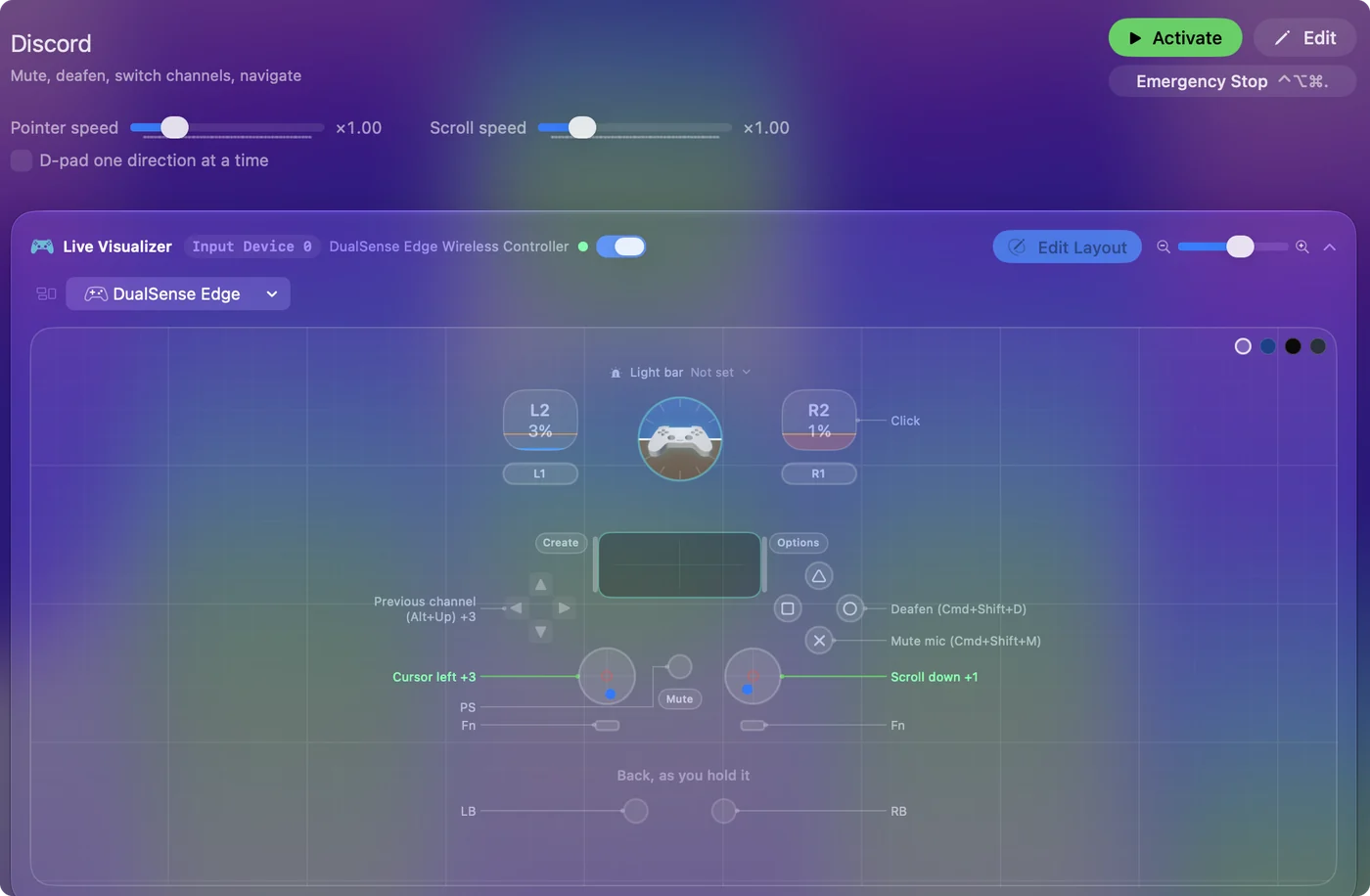
| Controller | Sends | What it does |
|---|---|---|
| A / Cross | Command (Left), Shift (Left), M | Mute mic (Cmd+Shift+M) |
| B / Circle | Command (Left), Shift (Left), D | Deafen (Cmd+Shift+D) |
| D-pad up | Alt / Option (Left), Up | Previous channel (Alt+Up) |
| D-pad down | Alt / Option (Left), Down | Next channel (Alt+Down) |
| D-pad left | Alt / Option (Left), Command (Left), Up | Previous server |
| D-pad right | Alt / Option (Left), Command (Left), Down | Next server |
| Left stick left | Mouse motion left (speed 16) | Cursor left |
| Left stick right | Mouse motion right (speed 16) | Cursor right |
| Left stick up | Mouse motion up (speed 16) | Cursor up |
| Left stick down | Mouse motion down (speed 16) | Cursor down |
| Right stick down | Scroll down | Scroll down |
| Right stick up | Scroll up | Scroll up |
| Right trigger | Left click | Click |
Button names follow the Xbox / PlayStation pair shown in the editor, so A / Cross is the bottom face button on either pad. On a Switch Pro Controller the bottom button is labeled B; the mapping still fires on position.
Questions
Why does mute only work when Discord is in front?
Because the shortcut is not a Discord keybind yet. Add mute and deafen as keybinds in Discord's settings and they work from any app.
Can I put this in my game preset?
Yes, and that is the usual way: add the mute and deafen rows to the game's preset on spare buttons, with the same keys set as keybinds in Discord.
Can a foot pedal be my push-to-talk?
Yes. A pedal that sends a key, a sustain pedal on a MIDI keyboard, or a switch on an adaptive controller can hold Discord's push-to-talk key for as long as your foot is down. The foot pedal page covers which pedals work.
Related
Completely free. You don't have to make an account, there are no subscriptions, and nothing is locked. Optimized for Apple silicon. Open source on GitHub.
Updated