Twitch from a game controller
 The Twitch layout is built into InputConfig, free on the Mac App Store. You don't have to make an account, there are no subscriptions, and nothing is locked. Optimized for Apple silicon.
On a Mac: Twitch in any browser on the Mac. The player takes its keyboard shortcuts once it has focus, which the left stick click gives it.
Yes, a game controller makes a good remote for the Twitch player in a Mac browser. With a stream on the TV and a controller on the sofa, play and pause, fullscreen, theater mode, mute and volume are on the buttons, and a pointer handles the chat you will scroll and mostly not type in. Twitch's player uses YouTube-style keys, so the layout is that with theater mode added.
The layout, control by control
How the layout thinks
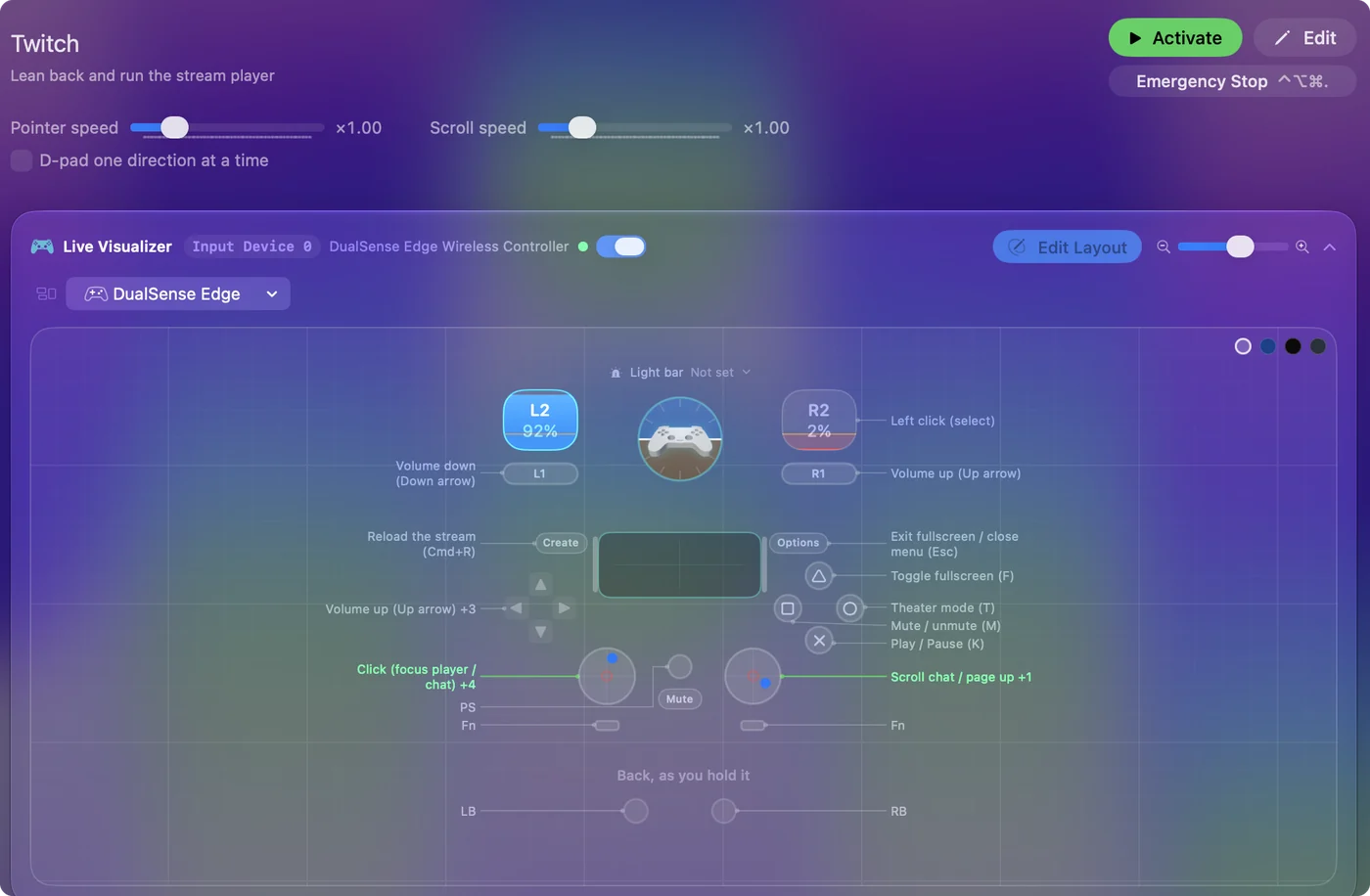
- Player. Play and pause (K) is the bottom face button, fullscreen (F) the top, mute (M) the left, and theater mode (T) the right.
- Volume. The bumpers and D-pad up and down raise and lower it.
- Browser. D-pad left and right go back and forward, Create reloads the stream (Command R), and Options is Escape.
- Pointer. The left stick moves it, the right stick scrolls chat, the right trigger clicks, and the left stick click focuses the player.
Press the left stick once to give the player focus, and every other button works.
Tune it
- Dictation into chat. Click the chat box with the pointer, press a button with the Start Dictation output, and talk. It is faster than it sounds and slower than typing.
- Channel points and Follow. They are pointer clicks. A slower pointer helps. Lower Pointer speed on the preset's page.
If the buttons do nothing, the player does not have focus yet, so press the left stick.
The short version
- Open the stream. Any browser on the Mac works.
- Focus the player. Press the left stick once.
- Lean back. Volume, pause and fullscreen are under your thumbs.
The pad is a remote: focus once, then watch.
Get it in two clicks
- Get InputConfig free on the Mac App Store, open it, and click Smart Preset Maker on the welcome screen.
- Search for Twitch and pick it. The layout is created as a preset in your sidebar, named and ready.
- Press Activate. Every row can be changed afterwards: the editor's Scan button rebinds any control the moment you touch it.
Every binding, as a table
| Controller | Sends | What it does |
|---|---|---|
| A / Cross | K | Play / Pause (K) |
| Y / Triangle | F | Toggle fullscreen (F) |
| X / Square | M | Mute / unmute (M) |
| B / Circle | T | Theater mode (T) |
| RB / R1 | Up | Volume up (Up arrow) |
| LB / L1 | Down | Volume down (Down arrow) |
| Start / Options | Escape | Exit fullscreen / close menu (Esc) |
| Back / Share / Select | Command (Left), R | Reload the stream (Cmd+R) |
| L3 (left stick click) | Left click | Click (focus player / chat) |
| D-pad up | Up | Volume up (Up arrow) |
| D-pad down | Down | Volume down (Down arrow) |
| D-pad left | Alt / Option (Left), Left | Browser back (Alt+Left) |
| D-pad right | Alt / Option (Left), Right | Browser forward (Alt+Right) |
| Left stick right | Mouse motion right (speed 20) | Move pointer right |
| Left stick left | Mouse motion left (speed 20) | Move pointer left |
| Left stick down | Mouse motion down (speed 14) | Move pointer down |
| Left stick up | Mouse motion up (speed 14) | Move pointer up |
| Right stick up | Scroll up | Scroll chat / page up |
| Right stick down | Scroll down | Scroll chat / page down |
| Right trigger | Left click | Left click (select) |
Button names follow the Xbox / PlayStation pair shown in the editor, so A / Cross is the bottom face button on either pad. On a Switch Pro Controller the bottom button is labeled B; the mapping still fires on position.
Questions
Does it work in any browser?
Yes. The player takes its keyboard shortcuts in any browser on the Mac once it has focus, which the left stick click gives it.
Related
Completely free. You don't have to make an account, there are no subscriptions, and nothing is locked. Optimized for Apple silicon. Open source on GitHub.
Updated