Can the Stream Deck + dials do more on a Mac?
 InputConfig is completely free on the Mac App Store. You don't have to make an account, there are no subscriptions, and nothing is locked. Optimized for Apple silicon.
Yes. Elgato's Stream Deck app gives each dial a rotate and a press action and the touch strip a tap and a long press, and on a Mac that is the first thing to set up. Since version 1.8, InputConfig, the free Mac app I make, also reads the dials and the touch strip of the Stream Deck + and + XL and the dials of the Stream Deck Studio, so each turn, press, tap and swipe can be part of a per-app layout with a hold, a macro or a MIDI message.
Stream Deck support in InputConfig is experimental, and I have not tested every model. Elgato's app still does things InputConfig does not, starting with pictures on the keys and live values on the strip.
On this page: 9 sections
Steps
- Set up the deck in Elgato's Stream Deck app and decide which dials and keys stay there.
- Leave the controls you want InputConfig to handle empty in Elgato's app.
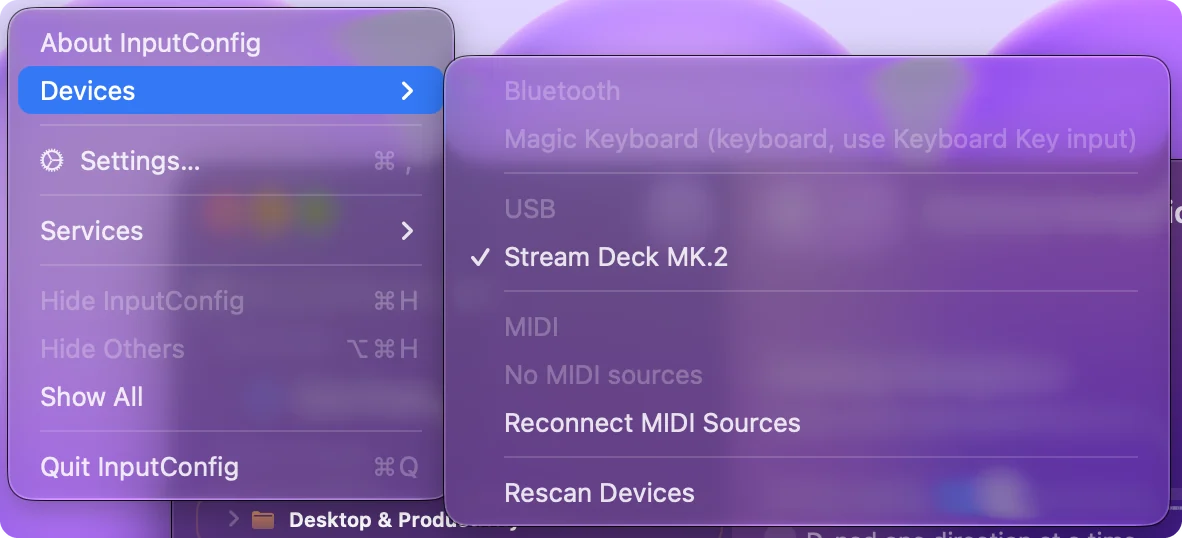
- In InputConfig, open Devices in the menu bar and tick the Stream Deck.
- Add a row, press Scan and turn a dial one way, press it, or tap or swipe the touch strip.
- Give the row an output, Save and Activate, and list the apps it is for under Activate when these apps are in front.
Check your model's dials
Elgato's technical specification pages, which I read on October 23, 2026, give the hardware. The 1.8 release notes name the Stream Deck +, + XL, Studio and Module 15 together.
| Model | Keys | Dials | Touch strip |
|---|---|---|---|
| Stream Deck + | 8 | 4, each pressable | Yes |
| Stream Deck + XL | 36 | 6, each pressable | Yes, 1200 by 100 pixels |
| Stream Deck Studio | 32 | 2, each pressable, with an LED ring | No |
| Stream Deck Module 15 | 15 | None | No |
The Studio is a 1U rack unit that takes Ethernet with PoE+ or USB-C, and its NFC reader needs a Bitfocus Button subscription, according to Elgato. On the + and + XL the strip is an input too, so a deck with six dials has well over a dozen extra controls.
Know what Elgato's app does with the dials
Elgato's Stream Deck + dials introduction lists four functions: rotate, press, touch strip tap and touch strip long press. You open the Dials tab and drag an action onto a dial. A Hotkey action can hold a different shortcut for each turn and the press. Elgato notes that not every plugin supports dials, that pressing a dial and tapping the strip above it do the same thing, and that some plugins add a long press.
Elgato's system requirements page says Stream Deck 6.9 and later need macOS 13 Ventura on a Mac. If a plugin already turns a dial into what you need, such as an OBS or audio control, keep that dial in Elgato's app.
Connect the deck in InputConfig
- You: In InputConfig, open Devices in the menu bar and tick the Stream Deck under USB. Then add a row, press Scan, and turn a dial one way.
- InputConfig: Opens the deck and binds the row. On a Stream Deck +, each dial pressed, turned left and turned right, and the strip tapped, long pressed and swiped left or right, is a button of its own after the eight keys.
- Check: The row fills with the control's name. Turn the other way on a new row for the other direction.
A turn or a swipe is one short press, not a position. So a dial in InputConfig steps: each click of rotation fires its row once. The + XL and Studio dials are in the same 1.8 list, and Scan names whatever each one reports. Treat each dial as two buttons and a press, and the layouts write themselves.
Give the dials Mac jobs
A stepped dial fits anything that happens in steps. These are the rows I would start with:
| Control | Output | Where |
|---|---|---|
| Dial 1 left and right | System volume down and up, a System Function | Every app |
| Dial 1 press | Mute / Unmute | Every app |
| Dial 2 left and right | Left and right arrow, one frame each | Final Cut Pro, Premiere Pro |
| Dial 3 left and right | Command minus and Command plus, to zoom | Editors, browsers, Preview |
| Strip swipe left and right | Control Left Arrow and Control Right Arrow, to change desktops | Every app |
| Strip long press | Mission Control | Every app |
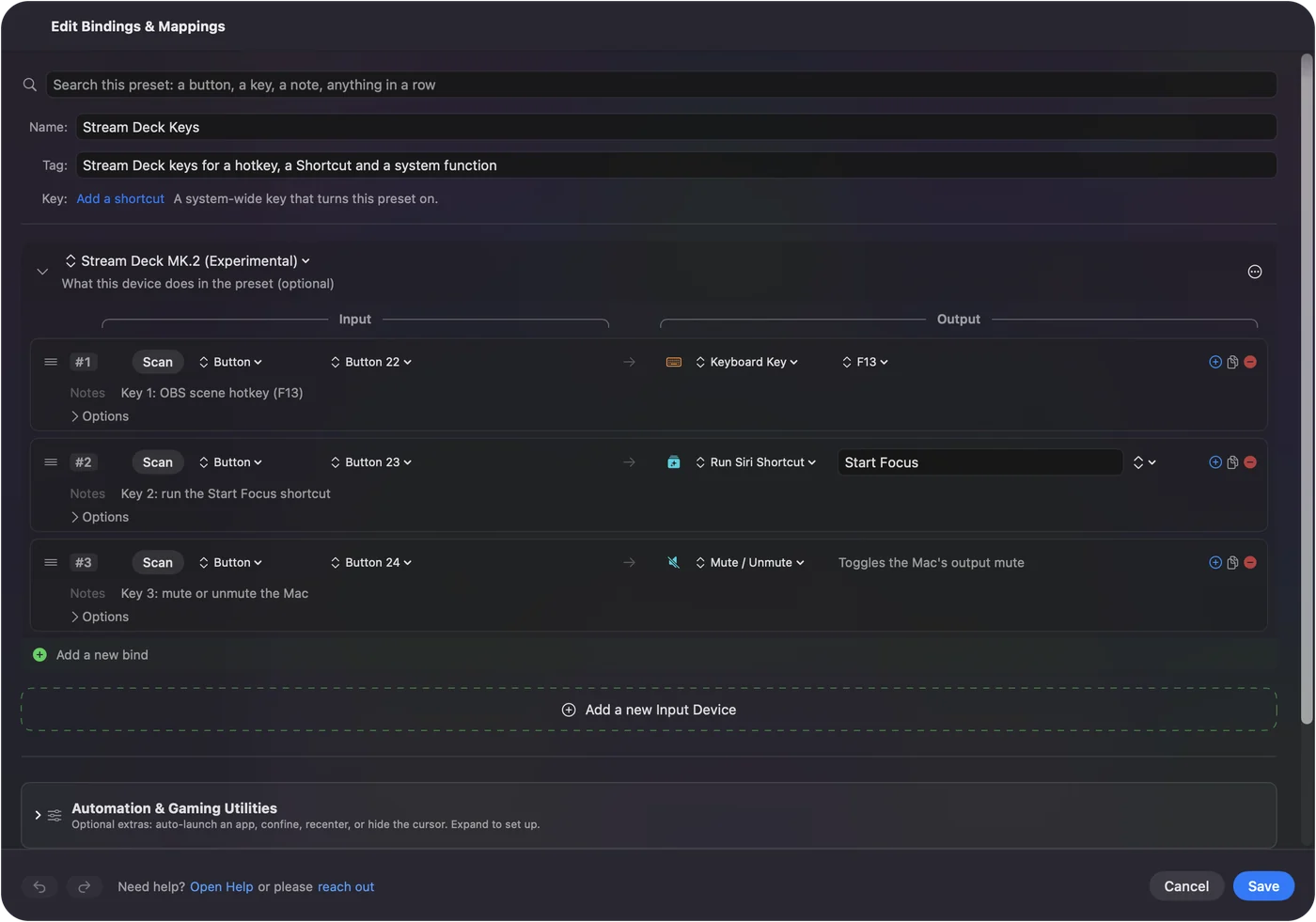
Each row can also send MIDI, run a macro, or have a hold and double tap action, and a preset per app gives the same dial a new job when the app changes. The Stream Deck as a MIDI controller page has the MIDI side. Volume on one dial and frame steps on another are the two that earn their place fastest.
Share the deck with Elgato's app
InputConfig opens the deck without taking it away from Elgato's app, so both hear every press. Climb this ladder, smallest step first:
- Split the controls. Leave the dials and keys you give InputConfig empty in Elgato's app.
- Use F13 to F19. Elgato's app can send F13 to F19 from a key or a Hotkey dial action, and InputConfig binds those like any key, with no deck support needed.
- Quit Elgato's app. If something still fires twice, quit it while you test.
- Bind by Scan. The support is experimental. If a model numbers its controls oddly, Scan names what really arrived.
One app per control: Elgato's for pictures and plugins, InputConfig for per-app jobs.
What Elgato's app does that InputConfig does not
- Pictures and values. Elgato draws on the keys and shows what each dial controls on the touch strip. InputConfig draws nothing.
- Plugins. Elgato's plugins talk to OBS and other apps directly and can show live status.
- Smooth dial values. In InputConfig a turn is a step, not a position, so a dial is not a continuous fader.
- The Studio's extras. Its LED rings and NFC are Elgato's and Bitfocus's.
- Every model checked. Stream Deck support in InputConfig is experimental.
The short version
- Plugins and pictures. Keep those dials in Elgato's app.
- Per-app jobs, holds, macros and MIDI. Tick the deck in InputConfig, Devices, and Scan each turn, press and swipe.
- Both. Leave InputConfig's controls empty in Elgato's app.
Split the dials between the two apps, and the deck does more than either app alone.
Questions
Can InputConfig read the Stream Deck + dials?
Yes, since version 1.8, as an experimental feature. Each dial pressed, turned left and turned right, and the touch strip tapped, long pressed and swiped, is a control of its own.
Does the Stream Deck + work on a Mac without Elgato software?
Its keys, dials and touch strip can be InputConfig inputs with Elgato's app quit, but nothing is drawn on the keys or the strip without Elgato's app.
What macOS does the Stream Deck app need?
Elgato's requirements page says Stream Deck 6.9 and later need macOS 13 Ventura or later.
Can a Stream Deck dial control the Mac volume?
Yes. In InputConfig, put the system volume down and up functions on a dial's left and right turns and Mute / Unmute on its press.
Why does a dial turn fire twice?
Elgato's app and InputConfig both heard it. Leave that dial empty in Elgato's app, or quit Elgato's app.
Related
Completely free. You don't have to make an account, there are no subscriptions, and nothing is locked. Optimized for Apple silicon. Open source on GitHub.
Updated