Does Loupedeck still work on a Mac?
 InputConfig is completely free on the Mac App Store. You don't have to make an account, there are no subscriptions, and nothing is locked. Optimized for Apple silicon.
Yes. Loupedeck's download page offers software 6.4.1 for macOS, for OS X 10.15 or later, and it supports the Loupedeck CT, Live, Live S and Loupedeck+. Logitech stopped selling Loupedeck consoles on March 28, 2025 but kept support going, and what ended on March 30, 2026 was the legacy 5.8 software and its marketplace. None of the Loupedeck consoles moved into Logi Options+, and the original Loupedeck only runs with software 5.1 and earlier. I read all of this on Loupedeck's own pages on October 22, 2026.
I make InputConfig, a free Mac app. It does not replace the Loupedeck app, but it can give a Loupedeck button that sends a key a hold, a double tap, a macro or a layout per app. I have not tested a Loupedeck myself.
On this page: 11 sections
- Steps
- Match your console to its software
- What ended, and what did not
- Run Loupedeck and Logi Options+ on one Mac
- Fix a console that does not respond on a Mac
- See what the console shows macOS without its software
- Add holds, macros and per-app layouts to Loupedeck keys
- Look at the alternatives on this site
- What it cannot do
- The short version
- Questions
Steps
- Install Loupedeck 6.4.1 for macOS from Loupedeck's download page.
- If Logi Options+ is on the same Mac, keep both apps up to date.
- Tick Logi Plugin Service in System Settings, Privacy & Security, Accessibility.
- To test what the console sends on its own, quit the Loupedeck app and press Scan in InputConfig.
- To add more than a shortcut, set a button to F13 in Loupedeck and bind F13 in InputConfig.
Match your console to its software
Loupedeck's download page and release notes, which I read on October 22, 2026, split the consoles like this. No Loupedeck console moved into Logi Options+. The MX Creative Console is the one Logitech device in this family that Options+ runs, and Loupedeck's troubleshooting page says its own consoles still need the Loupedeck app, version 6.0 or later.
| Console | Software on a Mac |
|---|---|
| Loupedeck CT | Loupedeck 6.4.1 |
| Loupedeck Live | Loupedeck 6.4.1 |
| Loupedeck Live S | Loupedeck 6.4.1 |
| Loupedeck+ | Loupedeck 6.4.1 |
| Razer Stream Controller and Stream Controller X | Loupedeck 6.4.1 |
| Loupedeck original console | Software 5.1 and earlier only |
| Logitech MX Creative Console | Logi Options+ |
The download page lists 6.4.1 for macOS with OS X 10.15 or later required, and keeps 5.9.1 as a separate download. If you own a CT, a Live or a Live S, the Loupedeck app is still the one to install, not Options+.
What ended, and what did not
Logitech bought Loupedeck in 2023, and three announcements on Loupedeck's own site set out what happened next.
- Sales ended on March 28, 2025. Loupedeck said it would stop selling the product line and focus on the MX Creative Console, while warranty claims and technical support continue as usual.
- One backend since 6.0. The same post says the backend shared with the MX Creative Console, introduced in software 6.0, lets Loupedeck owners use future updates and plugins made for the Creative Console.
- Legacy 5.8 ended on March 30, 2026. Loupedeck's March 26, 2026 notice says software 5.8 and its marketplace lost support because the cloud services they need are gone, so 5.8 users can no longer add plugins from that marketplace. It told them to move to 6.2.4, and the download page has since moved on to 6.4.1.
- The original console stops at 5.1. Loupedeck lists it as compatible only with software 5.1 and earlier.
The legacy app is what ended, while the consoles and the current Loupedeck app are still supported. Loupedeck's end of sales post has the full wording.
Run Loupedeck and Logi Options+ on one Mac
The two apps share a background component called Logi Plugin Service. Loupedeck's troubleshooting page explains what that means in practice:
- Loupedeck 5.9.1 and Options+. The last Options+ that works with 5.9.1 is version 1.82. Once Options+ updates to 1.83, Loupedeck 6.0 or later becomes mandatory, or you turn off automatic updates in Options+.
- MX Creative Console owners. The console always needs the latest Options+, so the Loupedeck app has to be on 6.0 or later beside it.
- Razer Stream Controllers. The 6.4.1 release notes fix those controllers going undetected when Options+ was installed on the same Mac.
Keep both apps current, because an old Loupedeck app beside a new Options+ is the most common way a console goes dead.
Fix a console that does not respond on a Mac
Loupedeck's page on macOS consoles whose buttons and dials do not respond, and its Apple silicon page, both read on October 22, 2026, give these steps. Climb this ladder, smallest step first:
- Update the app. Install 6.4.1 from Loupedeck's download page, especially if Options+ is on the same Mac.
- Allow Logi Plugin Service. In System Settings, Privacy & Security, Accessibility, tick Logi Plugin Service. If it is already ticked, remove the Loupedeck entry with the minus button and add it back with the plus button.
- Check Automation. Loupedeck says some macOS versions also need System Events ticked under Installer in Privacy & Security, Automation.
- Apple silicon is fine. Loupedeck's page says its software is fully compatible with M1 and M2 Macs, and it credits Rosetta 2 for that.
- Plug in directly. Use the cable into the Mac, not a hub, while you test.
The entry to look for under Accessibility is Logi Plugin Service, not only the Loupedeck app.
See what the console shows macOS without its software
I could not find a Loupedeck page that says what a Live, Live S or CT sends to a Mac with no Loupedeck software running, and forum reports about the older Loupedeck+ disagree. So I will not guess. Test it with the app quit:
- You: Quit the Loupedeck app. Open InputConfig, add a Keyboard Key row and a Mouse row, press Scan on each and press a console button. Then look for the console in Audio MIDI Setup and in the Live Visualizer's MIDI layout.
- InputConfig: Names a key, a mouse button or a MIDI control if one arrives.
- Check: If nothing fills in and nothing lights, the console talks only to its own software, and no Mac app can read it on its own.
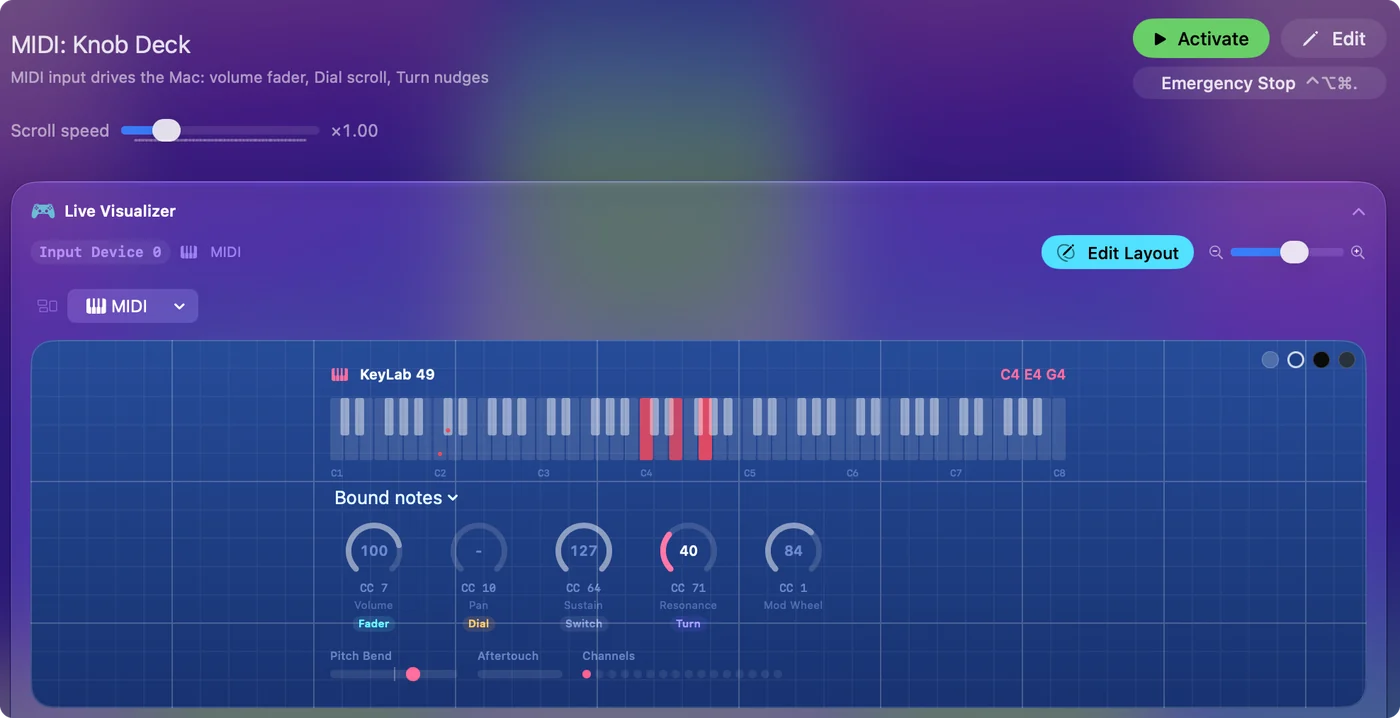
A quiet Scan is an answer too: it tells you the console needs the Loupedeck app running.
Add holds, macros and per-app layouts to Loupedeck keys
With the Loupedeck app running, the console can still feed InputConfig. Loupedeck's Keyboard Shortcut custom action presses a key on a single press or holds it like a keyboard key, according to Loupedeck's support pages. Set a few buttons to keys that type nothing, F13 to F20, and InputConfig can give each one more than a shortcut. F21 to F24 are not passed to apps by macOS. I have not tested a Loupedeck myself, so press Scan to confirm what arrives.
- You: In the Loupedeck app, give a button a Keyboard Shortcut custom action of F13. In InputConfig, add a Keyboard Key row, press Scan and press that button.
- InputConfig: Shows the row as F13 on Any keyboard.
- Check: Choose an output, Save, Activate, and press the button.
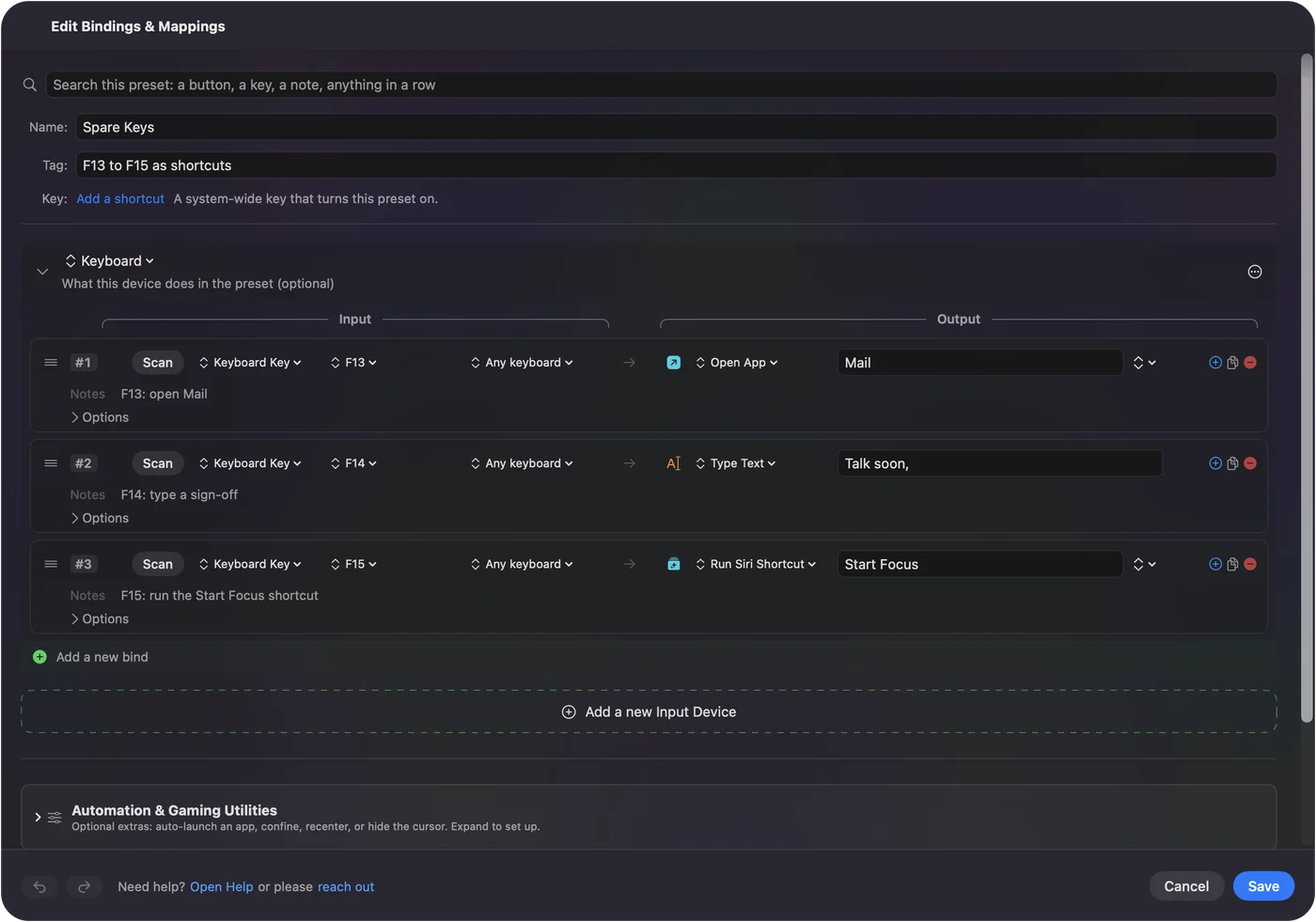
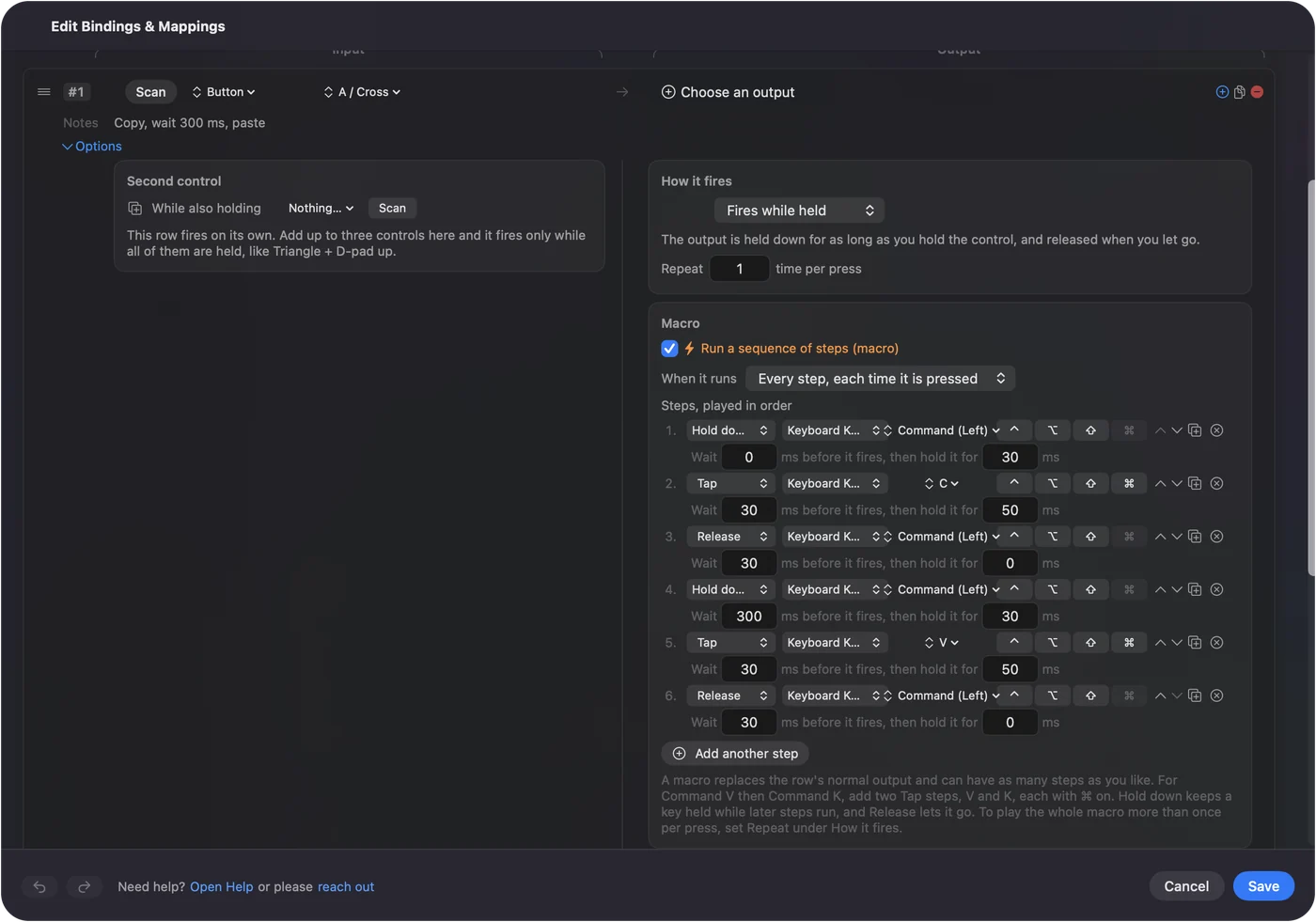
What that adds is a hold action and a double tap action on every button, a macro with waits between steps, Type Text, Open App, a Siri Shortcut, and a preset that follows the app in front. Keys are only listened to, so a Loupedeck button left on Command Z still undoes in the app as well. Leave Loupedeck's dials and plugins on the console, and give InputConfig the buttons that need a sequence.
Look at the alternatives on this site
- The MX Creative Console. Logitech's successor, run by Options+. MX Creative Console on a Mac covers it.
- A Stream Deck. InputConfig reads its keys directly, as an experimental feature. Stream Deck without Elgato software explains it.
- A game controller. A free shortcut remote for editing and drawing. A free TourBox alternative and a Speed Editor alternative build the layouts.
- A MIDI knob box. The closest free thing to a Loupedeck dial, with knobs in Turn mode. MIDI as input has the knob modes.
If you want dials, a cheap MIDI knob box is the free route, and Options+ with the MX Creative Console is the paid one.
What it cannot do
- Replace the Loupedeck app. InputConfig does not draw on the touch buttons, read the dials as dials, or run Loupedeck plugins.
- Read a console that sends nothing. If Scan stays empty with the app quit, the console needs its own software.
- Block a key. A button left on a shortcut sends that shortcut to the app too.
- Tell keyboards apart. Every keyboard, the console's keys included, counts as one.
The short version
- CT, Live, Live S, Loupedeck+. Loupedeck 6.4.1 for macOS, still supported.
- The original Loupedeck. Software 5.1 and earlier only.
- Options+ on the same Mac. Keep the Loupedeck app on 6.0 or later.
- More than a shortcut. Send F13 to F20 from Loupedeck and bind them in InputConfig.
Update the Loupedeck app first, allow Logi Plugin Service, and only then decide whether you need anything else.
Questions
Is there Loupedeck software for Mac?
Yes. Loupedeck's download page lists software 6.4.1 for macOS, for OS X 10.15 or later, supporting the CT, Live, Live S and Loupedeck+.
Does Loupedeck work on Apple silicon Macs?
Loupedeck's support page says its software is fully compatible with M1 and M2 Macs, crediting Rosetta 2.
Does the Loupedeck Live S work in Logi Options+?
Not that Loupedeck says. Its troubleshooting page says Loupedeck devices need the Loupedeck app, version 6.0 or later, which can run beside Options+.
Is Loupedeck software discontinued?
Legacy software 5.8 and its marketplace lost support on March 30, 2026. The current Loupedeck app is still offered, and Loupedeck said support continues after sales ended in March 2025.
Why do my Loupedeck buttons not respond on a Mac?
Loupedeck says to tick Logi Plugin Service under Privacy & Security, Accessibility, and on some macOS versions System Events under Automation. Keep the app current if Options+ is installed.
Related
Completely free. You don't have to make an account, there are no subscriptions, and nothing is locked. Optimized for Apple silicon. Open source on GitHub.
Updated