Does the Contour ShuttlePRO work on a current Mac?
 InputConfig is completely free on the Mac App Store. You don't have to make an account, there are no subscriptions, and nothing is locked. Optimized for Apple silicon.
Yes. Contour's driver post, which I read on October 23, 2026, offers version 5.1.1 for Sequoia, Tahoe and Golden Gate, and 5.1.0 for Sonoma, Sequoia and Tahoe, and it says Intel Macs are no longer supported. The step most people miss is the driver extension: after installing, you switch on the Contour app and its driver extension in System Settings, General, Login Items & Extensions. Without that, the new driver acts as if the ShuttlePRO is not plugged in.
I make InputConfig, a free Mac app. Since version 1.8 it reads a ShuttlePRO itself, the jog wheel, the shuttle ring and the buttons, so you can build your own layout for Final Cut Pro, Premiere Pro, DaVinci Resolve or Logic Pro, with holds, macros and a layout that changes with the app in front. I have not tested a ShuttlePRO myself, so Scan is how you check yours.
On this page: 10 sections
Steps
- Install the newest Mac driver from Contour's Pro v2 and Xpress drivers page.
- Open System Settings, General, Login Items & Extensions, turn on the Contour app, and turn on its driver extension under Driver Extensions.
- For your own layout, open InputConfig, add a row, press Scan and turn the jog wheel, the shuttle ring or press a button.
- Give each row the editor's shortcut, such as L for the shuttle turned right.
- Make one preset per editor and list each app under Activate when these apps are in front.
Install the driver that matches your macOS
Contour's Pro v2 and Xpress drivers page on its support site lists the current Mac drivers. As I read it on October 23, 2026:
| Driver | macOS Contour lists |
|---|---|
| 5.1.1 | Sequoia, Tahoe and Golden Gate |
| 5.1.0 | Sonoma, Sequoia and Tahoe |
| Older drivers | Contour's Drivers Archive, for older macOS versions |
The same page says Contour supports Apple silicon and no longer supports Intel Macs. Contour's product page describes the ShuttlePRO v2 as 15 programmable buttons around a jog wheel in the middle, for frame steps, and a shuttle ring around it, for fast forward and rewind. The ring springs back to the middle when you let go. On Sonoma or later, start with the 5.1 drivers and only reach for the archive if they fail.
Fix a ShuttlePRO the new driver cannot see
The common report on Contour's forum in October 2026 is that the 5.1 driver installs and then behaves as if no ShuttlePRO is connected, often after moving to a new Mac. Climb this ladder, smallest step first:
- Turn on the app. In System Settings, General, Login Items & Extensions, switch the Contour app on.
- Turn on the extension. On the same page, click the info button beside Driver Extensions and switch on the slider for Contour's extension. Contour's support staff give these two steps for Sequoia, Tahoe and Golden Gate.
- Remove a stale extension. One user who moved Macs with Migration Assistant found that deleting the app did not remove its driver extension. Deleting the extension from that Driver Extensions list, restarting and installing 5.1.1 again made macOS ask to activate it, and the ShuttlePRO came back.
- Plug in directly. Test on a port on the Mac, then try the hub or adapter again.
- Use an older driver. Another user got the old 3.1.0 driver working on Golden Gate and imported old profiles with it. Contour points people on older macOS versions to its Drivers Archive.
If the driver sees nothing, the extension switch is the first place to look, not the cable.
Read the jog, the shuttle and the buttons in InputConfig
InputConfig 1.8 reads the ShuttlePRO as a device of its own: the jog wheel, the shuttle ring and each button are inputs.
- You: Add a row, press Scan, and turn the shuttle ring all the way to one side and hold it there. Do the same on new rows for the other side, for the jog wheel each way, and for each button you want.
- InputConfig: Binds each row to the first control it hears and shows its name.
- Check: Turn and press each control with the preset running. If a row named something else, press Scan again and touch nothing else while it listens.
If the ShuttlePRO is not listed, tick it under InputConfig, Devices in the menu bar. If InputConfig hears nothing while Contour's app runs, quit Contour's app and scan again. I have not confirmed how the two share the device on every Mac.
Scan each control once and the names tell you exactly what InputConfig heard.
Use these editing layouts
The shuttle turned right plays forward and turned left plays back, the jog steps a frame, and the buttons mark, cut and undo. These are each app's default shortcuts:
| Job | Final Cut Pro | Premiere Pro | DaVinci Resolve | Logic Pro |
|---|---|---|---|---|
| Shuttle right | L | L | L | Period (forward) |
| Shuttle left | J | J | J | Comma (rewind) |
| Stop or play | K, or Space | K, or Space | K, or Space | Space |
| Jog | Left and right arrow | Left and right arrow | Left and right arrow | Comma and period |
| Mark in and out | I and O | I and O | I and O | C for cycle |
| Cut at the playhead | Command B | Command K | Command B | Command T |
| Undo | Command Z | Command Z | Command Z | Command Z |
| Fit the timeline | Shift Z | Backslash | Shift Z | No fit key, Return goes to the start |
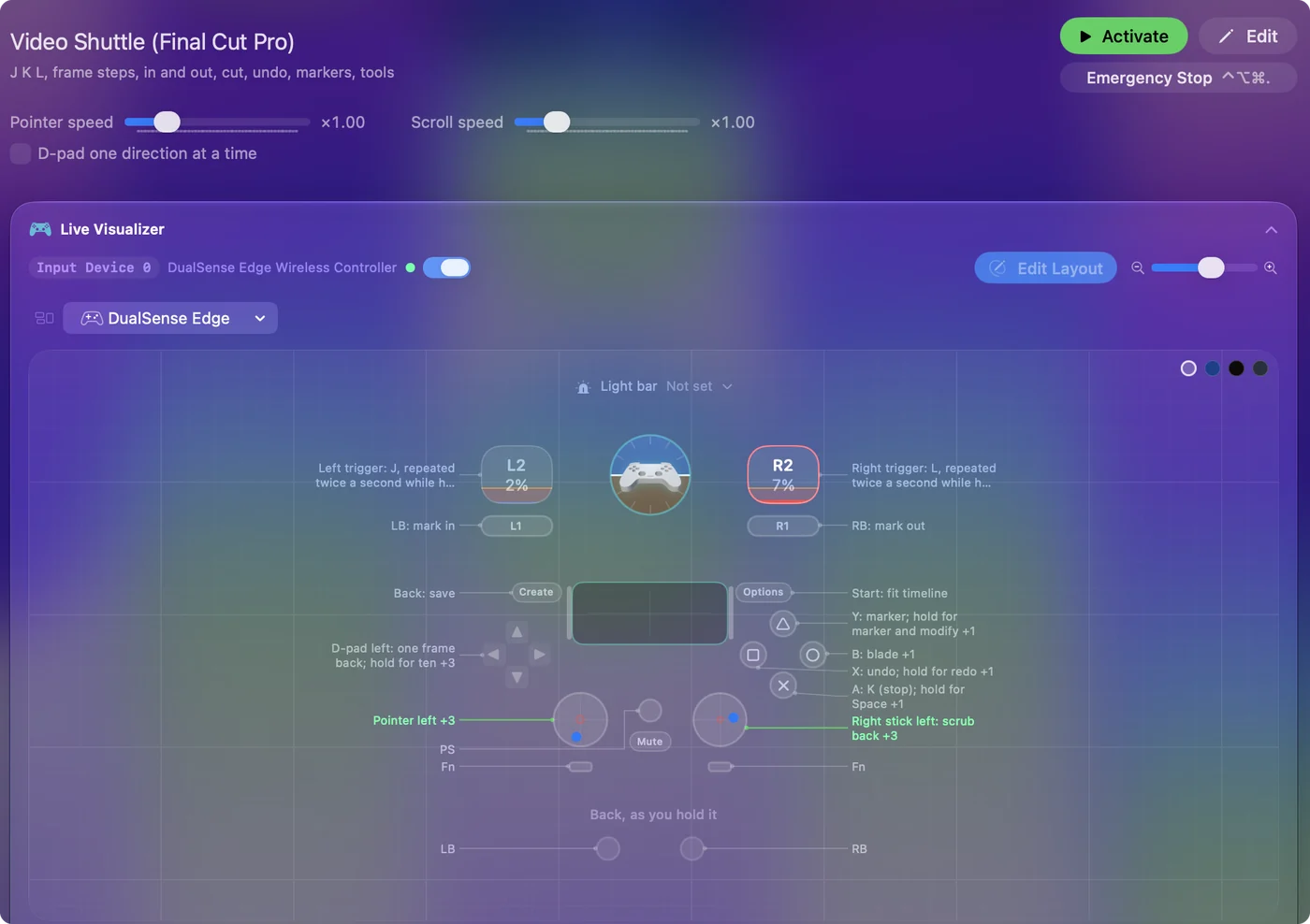
Final Cut, Premiere and Resolve play faster each time L is pressed again, so a turbo row on the shuttle's right side ramps through speeds while you hold it, like the triggers in the video editing shuttle guide. J, K, L and the arrows carry across three editors, so most of one layout serves all three.
Put more on 15 buttons
- Hold and double tap. Each row has a hold action and a double tap action, full second outputs. Undo on a tap, redo on a hold.
- Triple tap. Since 1.8 a row can also do something else on three quick taps.
- Macros. In a row's Options, Run a sequence of steps (macro) chains keys with a wait between them, such as add marker, wait, then name it.
- Apps and text. Open App, Type Text and Run Siri Shortcut work from any button.
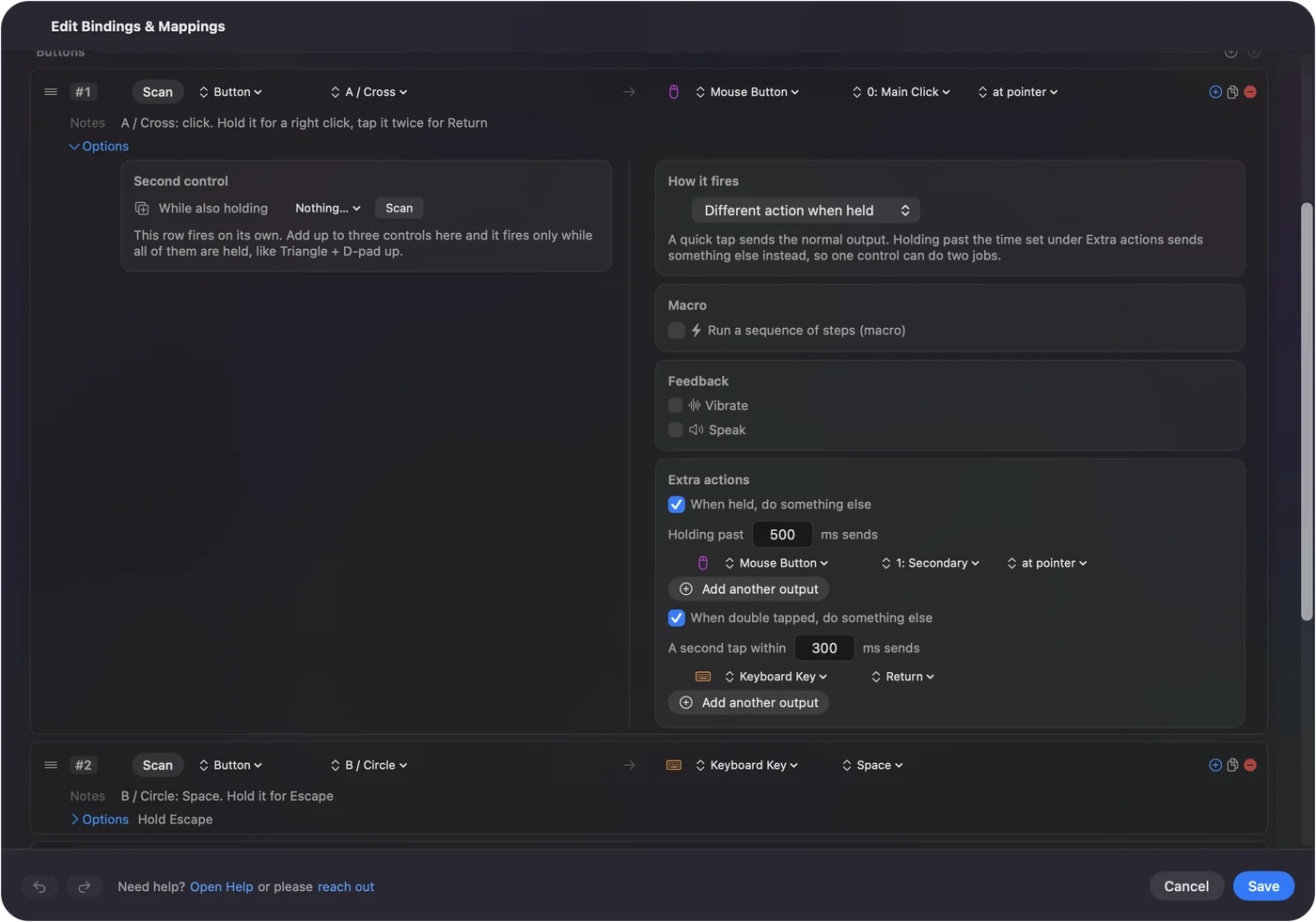
Fifteen buttons with three jobs each is more than most editors use.
Switch the layout with the editor in front
- You: Make one preset per editor, open Automation & Gaming Utilities, and add the app under Activate when these apps are in front. Turn on Switch presets when the front app changes in Settings, Advanced.
- InputConfig: Starts the editor's preset when that app comes to the front and goes back to the previous one when you leave.
- Check: Bring Premiere to the front and press your cut button. It sends Command K, not Command B.
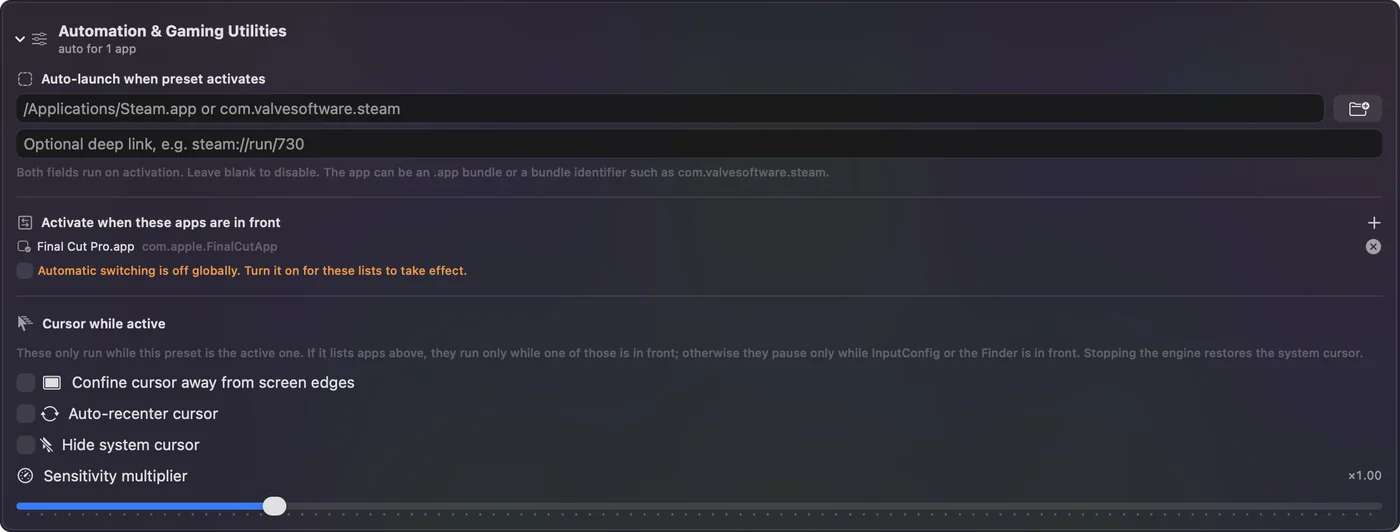
If Contour's app also has a setting for the same control in that editor, both act on each press. Give each control to one app: leave it empty in Contour's app if it lets you, or quit Contour's app while InputConfig runs. One app per control keeps a cut from happening twice.
What it cannot do
- Fix Contour's driver. If you want Contour's own app settings, the extension steps above are the fix.
- Import Contour profiles. InputConfig starts from its own rows.
- Talk to an editor's own ShuttlePRO support. InputConfig sends keys, clicks and scrolling, nothing more.
- Promise every model. I have not tested a ShuttlePRO or a ShuttleXpress myself. Scan tells you what arrives.
The short version
- Driver. 5.1.1 or 5.1.0 from Contour, with the app and the driver extension switched on.
- Not seen. Delete the old extension, restart and reinstall.
- Your own layout. Scan the jog, the shuttle and the buttons in InputConfig, one preset per editor.
Get the extension switched on first, then decide whether Contour's settings or your own rows suit you better.
Questions
Does the ShuttlePRO v2 work on macOS Tahoe?
Contour lists driver 5.1.0 for Sonoma, Sequoia and Tahoe, and 5.1.1 for Sequoia, Tahoe and Golden Gate, on its drivers page as read on October 23, 2026.
Why does the Contour driver not recognize my ShuttlePRO?
Switch on the Contour app and its driver extension in System Settings, General, Login Items & Extensions. If that fails, delete the old extension from the Driver Extensions list, restart and reinstall.
Does the ShuttlePRO work on Intel Macs?
Contour's drivers page says it no longer supports Intel based Macs. Older drivers are in its Drivers Archive.
Can I use a ShuttlePRO in DaVinci Resolve on a Mac?
Contour lists Resolve among the apps it works with. With InputConfig you can also build your own Resolve layout: J and L on the shuttle, the arrows on the jog, and Command B to cut.
Can I use a ShuttlePRO in Logic Pro?
Contour names Logic Pro among its supported apps. In InputConfig, comma and period on the ring, Space to play and Command T to split make a simple Logic layout.
Related
Completely free. You don't have to make an account, there are no subscriptions, and nothing is locked. Optimized for Apple silicon. Open source on GitHub.
Updated