PyCharm from a game controller
 The PyCharm layout is built into InputConfig, free on the Mac App Store. You don't have to make an account, there are no subscriptions, and nothing is locked. Optimized for Apple silicon.
On a Mac: Native on the Mac. The layout sends PyCharm's default keymap. Nothing to enable.
Yes, you can get around PyCharm on a Mac from a game controller: go to file, go to declaration, comment, run and debug are each one button. The layout sends PyCharm's default keymap, the same in every JetBrains IDE, with Python's run and debug. Nobody writes code with this. Everybody navigates it.
The layout, control by control
How the layout thinks
- Navigate. Go to file on the bottom face button (Command Shift O), go to declaration on the right (Command B).
- Edit and run. Comment line on the left (Command slash), run on the top (Control R), debug on Start (Control D).
- Find. Find on the left bumper (Command F), find in path on the right (Command Shift F).
- Save. Save all on Back (Command S).
- Pointer. The left stick moves the pointer, the right stick scrolls, the right trigger clicks. D-pad up and down move the caret a line.
Go to file and go to declaration are the two buttons you will press all day.
Make it yours
- Dictation. Both stick clicks are empty. Give one the Start Dictation output, for comments and commit messages.
- Refactor. Put rename on a chord row.
- Other JetBrains IDEs. The same layout works there. Per-app auto-switch turns it on for each.
With dictation on a stick click, comments no longer need the keyboard.
Check that it works
- You: Open a project in PyCharm, then press Activate on this preset.
- InputConfig: Sends the shortcuts in the table to the window in front.
- Check: Press the bottom face button and Go to File opens. If nothing happens, your keymap is not the default. Change that row's output.
If Go to File opens, the rest of the keymap matches.
Get it in two clicks
- Get InputConfig free on the Mac App Store, open it, and click Smart Preset Maker on the welcome screen.
- Search for PyCharm and pick it. The layout is created as a preset in your sidebar, named and ready.
- Press Activate. Every row can be changed afterwards: the editor's Scan button rebinds any control the moment you touch it.
Every binding, as a table
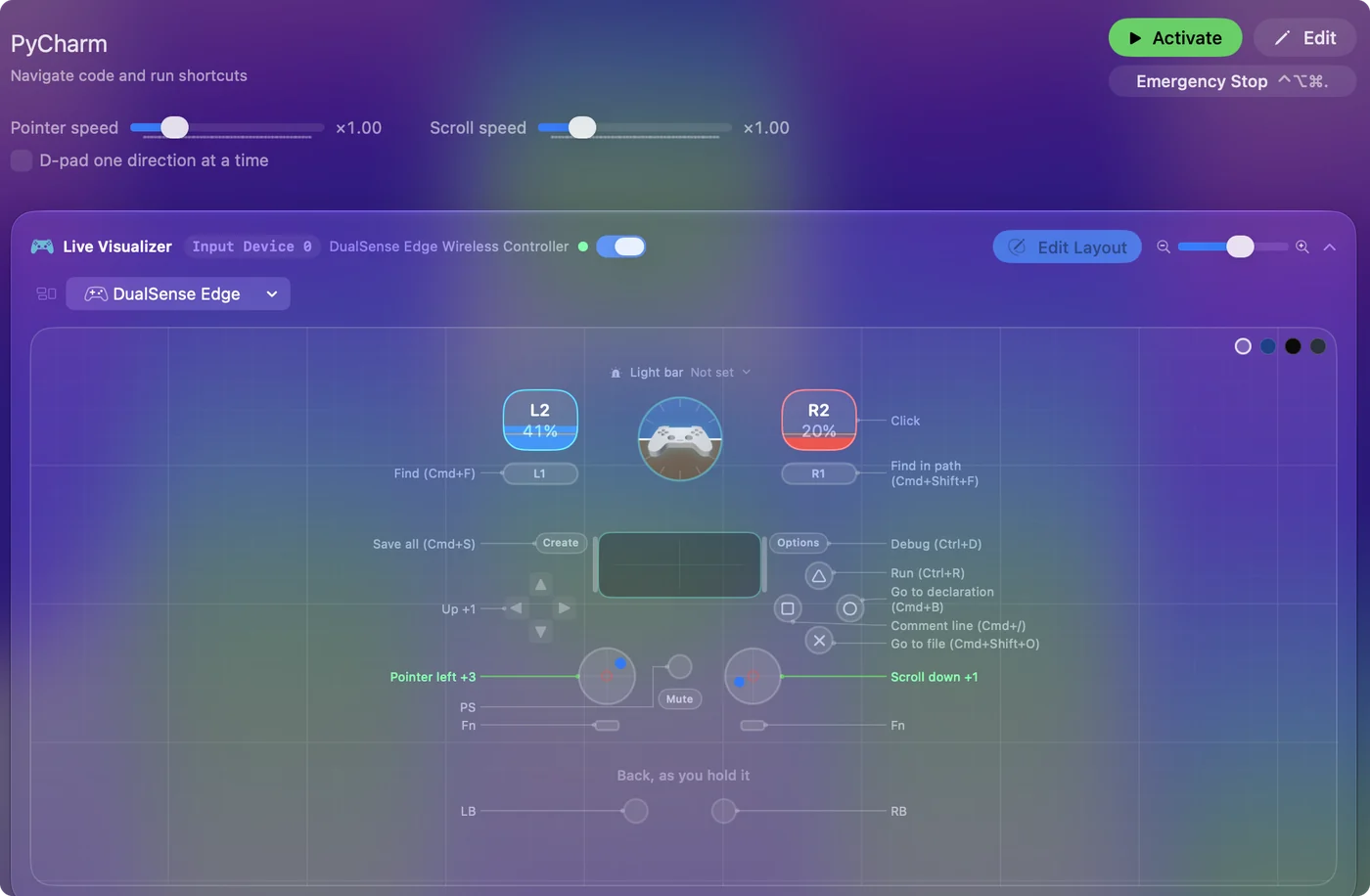
| Controller | Sends | What it does |
|---|---|---|
| Left stick left | Mouse motion left (speed 16) | Pointer left |
| Left stick right | Mouse motion right (speed 16) | Pointer right |
| Left stick up | Mouse motion up (speed 16) | Pointer up |
| Left stick down | Mouse motion down (speed 16) | Pointer down |
| Right stick down | Scroll down | Scroll down |
| Right stick up | Scroll up | Scroll up |
| Right trigger | Left click | Click |
| A / Cross | Command (Left), Shift (Left), O | Go to file (Cmd+Shift+O) |
| B / Circle | Command (Left), B | Go to declaration (Cmd+B) |
| X / Square | Command (Left), / | Comment line (Cmd+/) |
| Y / Triangle | Ctrl (Left), R | Run (Ctrl+R) |
| LB / L1 | Command (Left), F | Find (Cmd+F) |
| RB / R1 | Command (Left), Shift (Left), F | Find in path (Cmd+Shift+F) |
| Back / Share / Select | Command (Left), S | Save all (Cmd+S) |
| Start / Options | Ctrl (Left), D | Debug (Ctrl+D) |
| D-pad up | Up | Up |
| D-pad down | Down | Down |
Button names follow the Xbox / PlayStation pair shown in the editor, so A / Cross is the bottom face button on either pad. On a Switch Pro Controller the bottom button is labeled B; the mapping still fires on position.
Questions
Can I write code with a controller?
Navigating, yes. Writing, only with dictation. This layout is for the hand that is not on the keyboard.
Related
Completely free. You don't have to make an account, there are no subscriptions, and nothing is locked. Optimized for Apple silicon. Open source on GitHub.
Updated