Reach the menu bar and Dock from a game controller
 The Menu Bar and Dock layout is built into InputConfig, free on the Mac App Store. You don't have to make an account, there are no subscriptions, and nothing is locked. Optimized for Apple silicon.
On a Mac: Uses macOS keyboard access shortcuts, which are always on. On a laptop keyboard they need Fn; InputConfig sends the F keys directly, so no Fn is needed.
Yes, you can reach the Mac's menu bar, Dock and status menus from a game controller, using macOS's own keyboard access shortcuts on buttons. The menu bar is on the left bumper, the Dock on the right, the status menus on Back, Share or View, and the D-pad moves through whatever opened. Nothing needs turning on, and on a laptop no Fn is needed, because InputConfig sends the F keys directly.
The layout, control by control
How the layout thinks
- Open a menu. Menu bar (Control F2) on the left bumper, the Dock (Control F3) on the right, status menus (Control F8) on Back, Share or View, Spotlight on Start.
- Move through it. The D-pad moves through items, the bottom face button activates (Return), the right dismisses (Escape).
- Move between controls. Tab and Shift Tab on the left and top face buttons.
- Switch apps and windows. The app switcher on the left stick click, the windows of the same app on the right.
- Point and click. The left stick is a pointer, and the triggers click and right-click.
Use it
Step 1: Open a menu from the menu bar
- You: Press the left bumper.
- InputConfig: Sends Control F2, so macOS moves focus to the menu bar.
- Check: The Apple menu is highlighted. Press D-pad right to walk across the menus, D-pad down to open one, and the bottom face button to pick an item.
Step 2: Back out
- You: Press the right face button.
- InputConfig: Sends Escape.
- Check: The menu closes and focus returns to the window you were in.
Once the menu bar has focus, the D-pad reaches every command an app has.
Tune it
- Add the rows to other presets. The three focus rows belong in any preset that needs the menu bar.
- Jump to a menu. Once the menu bar has focus, typing a menu's first letters selects it. A Start Dictation row will not help there, but the D-pad will.
- Spoken feedback. Each button can say its job, for someone who cannot see the screen well.
- A screen reader. The VoiceOver layout is the one for VoiceOver users.
This is a Mac without a mouse, on a pad.
Get it in two clicks
- Get InputConfig free on the Mac App Store, open it, and click Smart Preset Maker on the welcome screen.
- Search for Menu Bar and Dock and pick it. The layout is created as a preset in your sidebar, named and ready.
- Press Activate. Every row can be changed afterwards: the editor's Scan button rebinds any control the moment you touch it.
Every binding, as a table
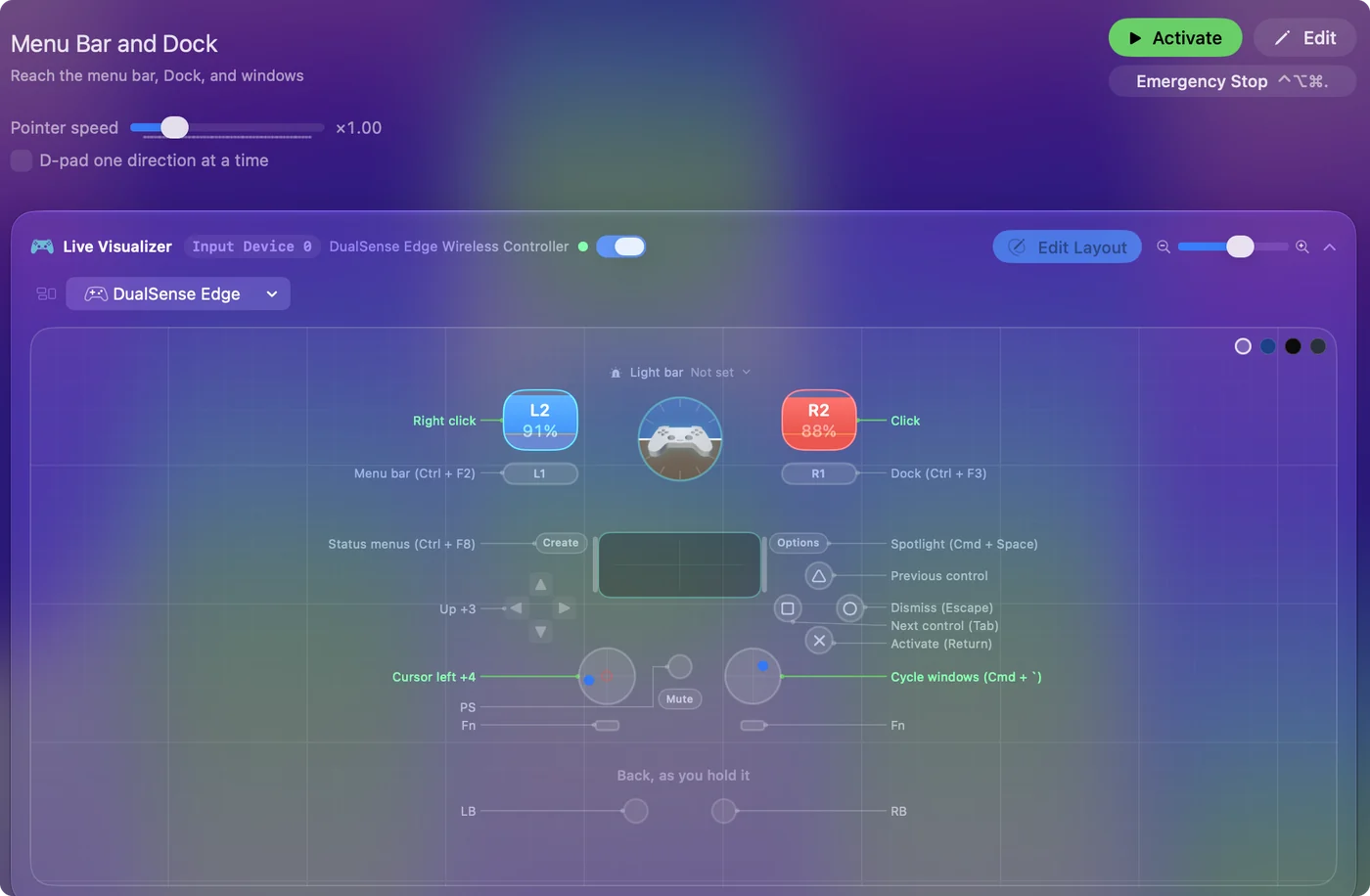
| Controller | Sends | What it does |
|---|---|---|
| Left stick left | Mouse motion left (speed 16) | Cursor left |
| Left stick right | Mouse motion right (speed 16) | Cursor right |
| Left stick up | Mouse motion up (speed 16) | Cursor up |
| Left stick down | Mouse motion down (speed 16) | Cursor down |
| D-pad up | Up | Up |
| D-pad down | Down | Down |
| D-pad left | Left | Left |
| D-pad right | Right | Right |
| A / Cross | Return | Activate (Return) |
| B / Circle | Escape | Dismiss (Escape) |
| X / Square | Tab | Next control (Tab) |
| Y / Triangle | Shift (Left), Tab | Previous control |
| LB / L1 | Ctrl (Left), F2 | Menu bar (Ctrl + F2) |
| RB / R1 | Ctrl (Left), F3 | Dock (Ctrl + F3) |
| Back / Share / Select | Ctrl (Left), F8 | Status menus (Ctrl + F8) |
| Start / Options | Command (Left), Space | Spotlight (Cmd + Space) |
| L3 (left stick click) | Command (Left), Tab | App switcher (Cmd + Tab) |
| R3 (right stick click) | Command (Left), ` | Cycle windows (Cmd + `) |
| Right trigger | Left click | Click |
| Left trigger | Right click | Right click |
Button names follow the Xbox / PlayStation pair shown in the editor, so A / Cross is the bottom face button on either pad. On a Switch Pro Controller the bottom button is labeled B; the mapping still fires on position.
Questions
Does this need any setting turned on?
No. The keyboard access shortcuts are always on in macOS.
What is the keyboard shortcut for the menu bar and Dock on a Mac?
Control F2 moves focus to the menu bar, Control F3 to the Dock and Control F8 to the status menus. On a laptop keyboard you may need to hold Fn as well. This layout sends them from buttons.
Related
Completely free. You don't have to make an account, there are no subscriptions, and nothing is locked. Optimized for Apple silicon. Open source on GitHub.
Updated