Preset chooser
 InputConfig is completely free on the Mac App Store.
Answer two or three questions and I'll point you to the preset, guide or catalog page that fits.
Pick what you are using
Pick what you want to do
Start here
Every preset can be changed afterward: the editor's Scan button rebinds any control the moment you press it.
How this fits with InputConfig
This page checks that a controller works. InputConfig is what puts it to work on a Mac: it maps every button, stick and trigger to keys, clicks, the pointer or scrolling, per app if you like, and its Live Visualizer draws the controller live with what each control does.
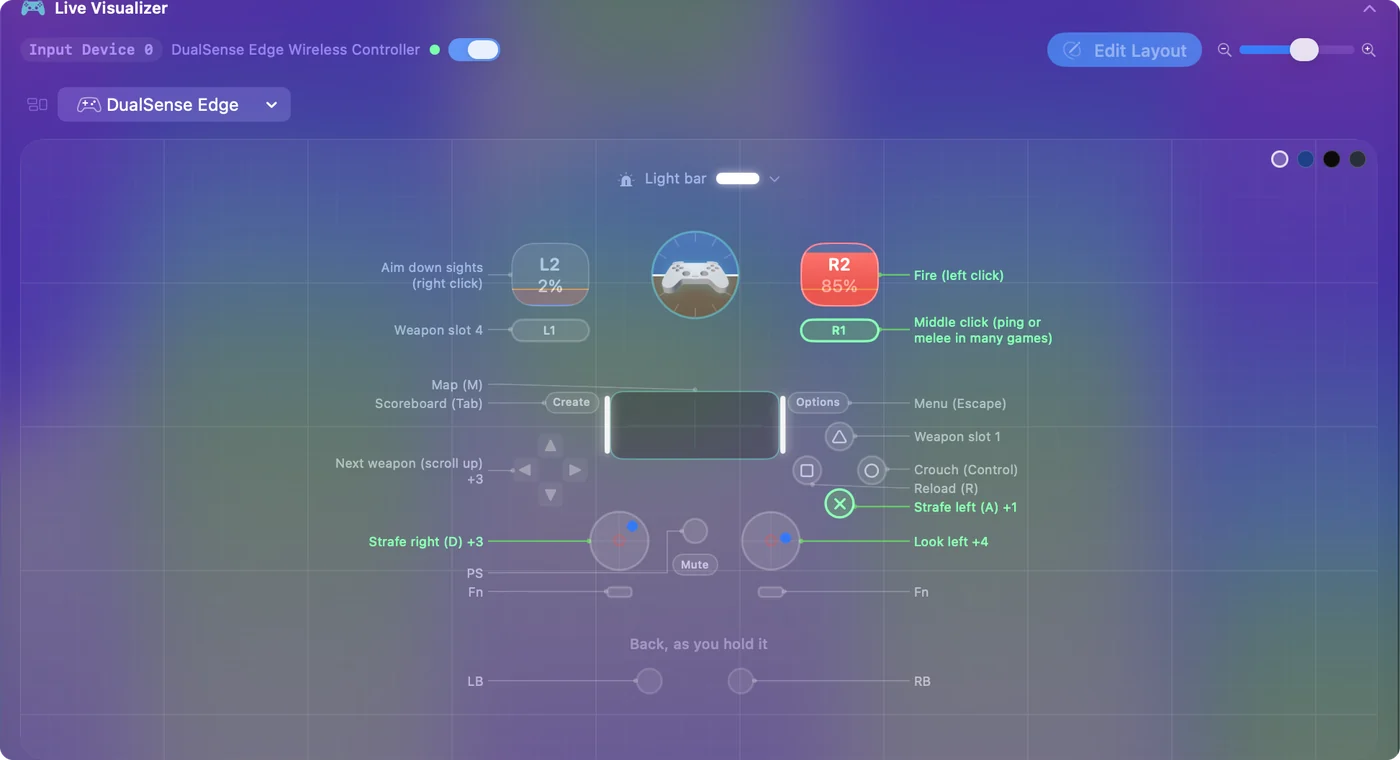
Use a controller as a mouse on a Mac shows it step by step. InputConfig is free on the Mac App Store.
More controller tests
- Gamepad tester
- Stick drift test
- PS5 controller drift test
- Xbox controller drift test
- Joy-Con drift test
- Controller vibration test
- Controller button test
- Controller trigger test
- Controller polling rate test
- Joystick test
- Racing wheel tester
- Arcade stick tester
- PS5 controller tester
- PS4 controller tester
- Xbox controller tester
- Switch Pro Controller tester
- Joy-Con tester
- 8BitDo controller tester
- Gamepad viewer and controller overlay
- Deadzone test and curve visualizer
- Controller button names and map
- Controller ID lookup
- Controller fix finder
- Mac game controller finder
Completely free. You don't have to make an account, there are no subscriptions, and nothing is locked. Optimized for Apple silicon. Open source on GitHub.
Updated