Android Studio from a game controller
 The Android Studio layout is built into InputConfig, free on the Mac App Store. You don't have to make an account, there are no subscriptions, and nothing is locked. Optimized for Apple silicon.
On a Mac: Sends the IntelliJ macOS keymap Android Studio uses by default, including Control R to run and Control D to debug.
Yes, you can drive Android Studio on a Mac from a game controller: find, run and debug, go to declaration and class, recent files, comment and Search Everywhere are all on the pad. Android Studio is IntelliJ with an emulator, so this is the IntelliJ idea with run and debug on the bumpers, where a finger presses them without moving the thumb. It sends the IntelliJ macOS keymap Android Studio uses by default.
On this page: 7 sections
The layout, control by control
How the layout thinks
- Click and find. Left click and right click on the bottom and right face buttons, Find on the left, Find in Path on the top.
- Run and debug. Run (Control R) on the right bumper, Debug (Control D) on the left.
- Move through code. D-pad left goes to declaration (Command B), right goes to class (Command O), up opens recent files (Command E), down comments the line.
- Search Everywhere. Share or View sends Shift twice, the double Shift, in one press. Options saves.
- Point and edit. The right stick is the pointer, the left stick scrolls, the left stick click undoes, the right stick click reformats code (Command Option L), and the left trigger is Tab.
The Search Everywhere row sends Shift with a repeat of 2 per press, so one press is two quick Shift taps. Run and debug sit under your fingers, so your thumbs never leave the code.
Tune it for Android Studio
- The emulator. A second preset for the emulator window, listed under Activate when these apps are in front, can send the keys your app expects. A game in the emulator may also read a controller connected to the Mac. Check your emulator's settings.
- Dictation. Press Search Everywhere, then Start Dictation, and say the class name.
- Feel the build start. Turn on Vibrate on the Run row.
If you changed the keymap, Scan the Control rows and press yours. Search Everywhere plus dictation finds any class by name.
The short version
- Same keymap as IntelliJ. The bumpers are run and debug here instead of find.
- Add dictation. It is for Search Everywhere.
- Give the emulator its own preset. Auto-switch hands over when it comes to the front.
The IntelliJ IDEA layout is the sibling. Navigate, run and debug from the pad, and do your typing by voice or on the keyboard.
Get it in two clicks
- Get InputConfig free on the Mac App Store, open it, and click Smart Preset Maker on the welcome screen.
- Search for Android Studio and pick it. The layout is created as a preset in your sidebar, named and ready.
- Press Activate. Every row can be changed afterwards: the editor's Scan button rebinds any control the moment you touch it.
Every binding, as a table
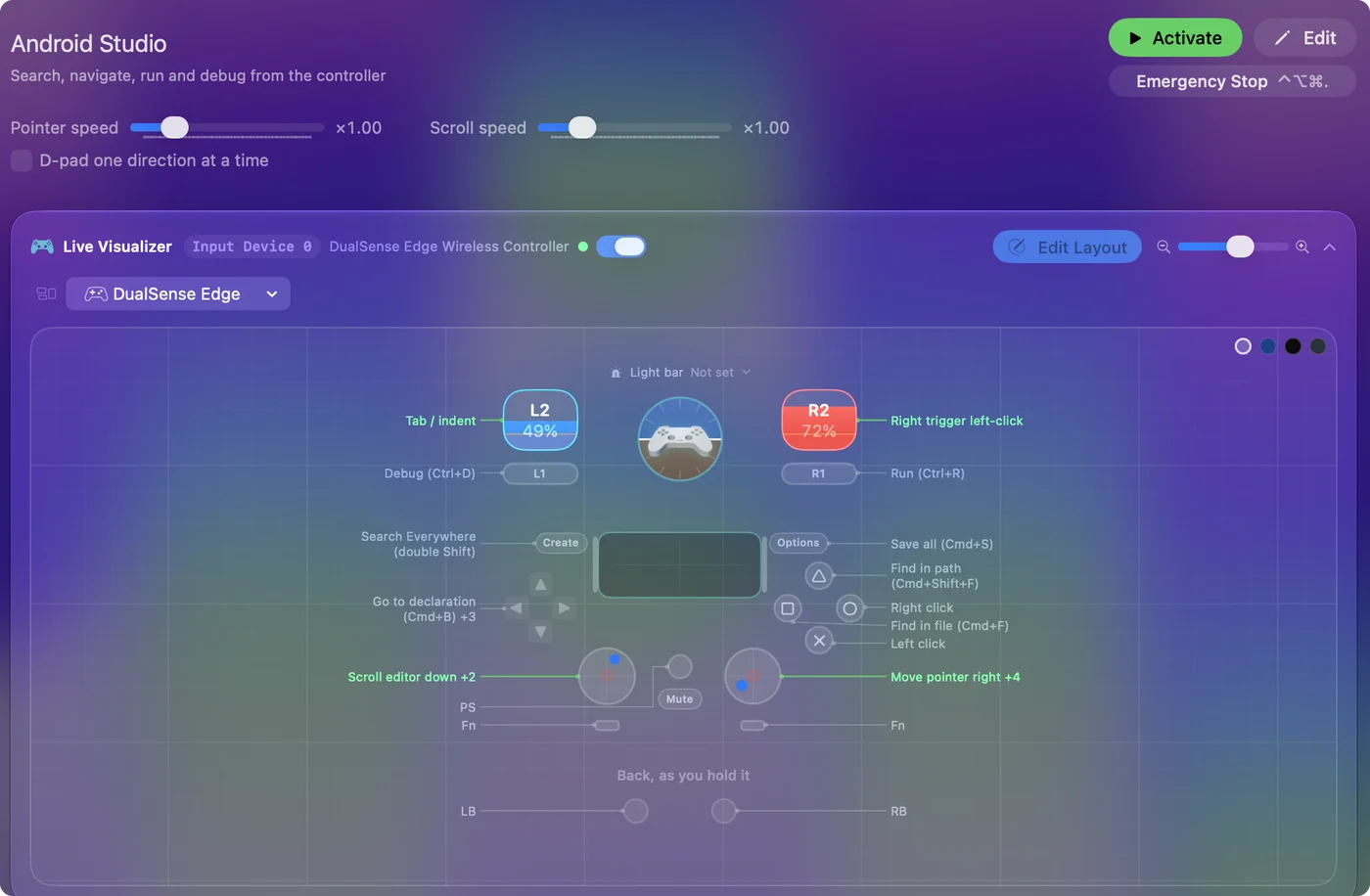
| Controller | Sends | What it does |
|---|---|---|
| Right stick right | Mouse motion right (speed 16) | Move pointer right |
| Right stick left | Mouse motion left (speed 16) | Move pointer left |
| Right stick down | Mouse motion down (speed 16) | Move pointer down |
| Right stick up | Mouse motion up (speed 16) | Move pointer up |
| Left stick down | Scroll down | Scroll editor down |
| Left stick up | Scroll up | Scroll editor up |
| A / Cross | Left click | Left click |
| B / Circle | Right click | Right click |
| X / Square | Command (Left), F | Find in file (Cmd+F) |
| Y / Triangle | Command (Left), Shift (Left), F | Find in path (Cmd+Shift+F) |
| RB / R1 | Ctrl (Left), R | Run (Ctrl+R) |
| LB / L1 | Ctrl (Left), D | Debug (Ctrl+D) |
| D-pad left | Command (Left), B | Go to declaration (Cmd+B) |
| D-pad right | Command (Left), O | Go to class (Cmd+O) |
| D-pad up | Command (Left), E | Recent files (Cmd+E) |
| D-pad down | Command (Left), / | Comment line (Cmd+/) |
| Back / Share / Select | Shift (Left); sent 2 times | Search Everywhere (double Shift) |
| Start / Options | Command (Left), S | Save all (Cmd+S) |
| L3 (left stick click) | Command (Left), Z | Undo (Cmd+Z) |
| R3 (right stick click) | Command (Left), Alt / Option (Left), L | Reformat code (Cmd+Opt+L) |
| Right trigger | Left click | Right trigger left-click |
| Left trigger | Tab | Tab / indent |
Button names follow the Xbox / PlayStation pair shown in the editor, so A / Cross is the bottom face button on either pad. On a Switch Pro Controller the bottom button is labeled B; the mapping still fires on position.
Questions
Does it match the IntelliJ layout?
It uses the same keymap, and the bumpers are run and debug here instead of find.
How does one button send double Shift?
The row sends Shift with a repeat of 2 per press, so one press is two quick Shift taps.
Related
Completely free. You don't have to make an account, there are no subscriptions, and nothing is locked. Optimized for Apple silicon. Open source on GitHub.
Updated